

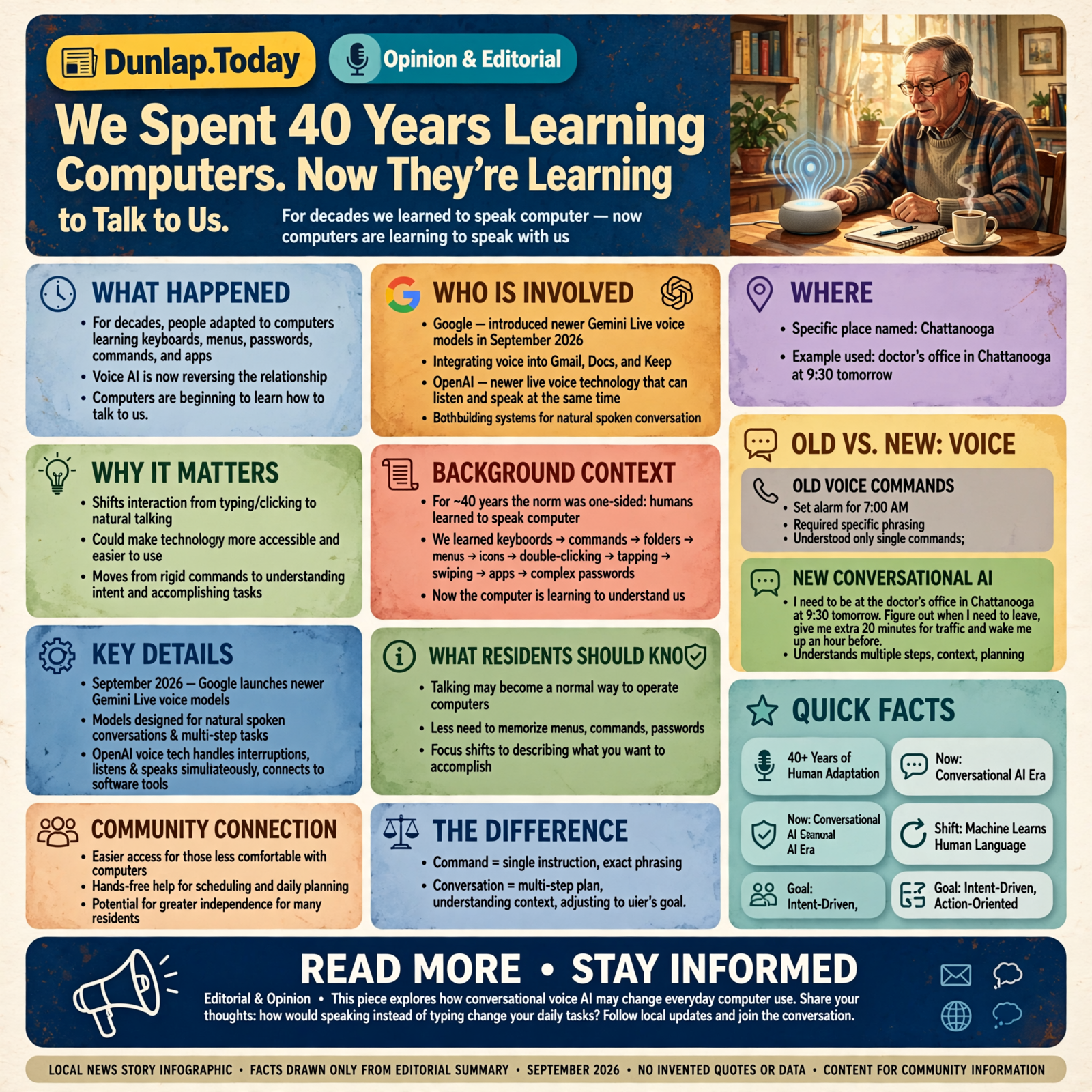
We Spent 40 Years Learning Computers. Now They’re Learning to Talk to Us.

For decades, people adapted themselves to computers—learning keyboards, menus, passwords, commands and apps. Voice AI is beginning to reverse that relationship. Increasingly, we may simply be able to tell the computer what we’re trying to accomplish.
Somewhere along the way, we all agreed to something fairly ridiculous.
If we wanted computers to help us, we had to learn how to speak computer.
We learned keyboards.
Then commands.
Then folders.
Then menus.
Then icons.
Then right-clicking.
Then double-clicking.
Then tapping.
Then swiping.
Then apps.
Then passwords that must contain one capital letter, one number, one punctuation mark, an ancient Egyptian hieroglyph and apparently the name of somebody’s first dog.
For roughly four decades, the arrangement has been remarkably one-sided:
If you want something from the computer, figure out how the computer wants you to ask for it.
Artificial intelligence may finally be turning that arrangement around.
The computer is beginning to learn how to talk to us.
We’ve Had Voice Commands Before

Talking to electronics isn’t entirely new.
We’ve been barking commands at phones, cars, televisions and smart speakers for years.
Sometimes they even did what we asked.
You might say:
“Call Wayne.”
And the phone would call Wayne.
Or Dave.
Or somebody named Juan you’d forgotten was still in your contacts.
Older voice assistants were useful, but they generally expected you to say a relatively specific thing in a relatively specific way.
They understood commands.
The newer generation of voice AI is being designed to understand something closer to conversation.
That’s a much bigger change.
A Command and a Conversation Aren’t the Same Thing

Consider the difference.
An old-style voice command might be:
“Set alarm for 7:00 AM.”
A conversational system might hear:
“I need to be at the doctor’s office in Chattanooga at 9:30 tomorrow. Figure out when I need to leave, give me an extra 20 minutes in case traffic is bad and wake me up an hour before that.”
That isn’t merely recognizing words.
The system has to understand what you’re trying to accomplish.
It needs to recognize several connected ideas:
- where you’re going,
- when you need to arrive,
- how long getting there might take,
- the extra time you requested,
- and when you want to wake up.
Then it has to turn those ideas into useful action.
That is the difference between a voice command and a voice assistant.
The Technology Is Moving Quickly

In September 2026, Google introduced newer Gemini Live voice models designed for more natural spoken conversations and multi-step tasks.
The company has also begun putting conversational voice capabilities into products such as Gmail, Docs and Keep, allowing people to search for information, organize ideas and work with documents by speaking.
OpenAI has been moving in the same general direction. Its newer live voice technology can listen and speak at the same time, handle interruptions more naturally and connect spoken conversations with software tools capable of performing tasks.
The product names will change.
They always do.
The important development isn’t which company currently has the fanciest voice model.
The important development is this:
Talking may become a normal way to operate a computer.
That Could Matter More Than It Sounds

If you’re comfortable with computers, talking instead of typing might initially sound like a convenience.
It could be much more important than that.
Every traditional computer interface creates barriers.
You need to know which program to open.
You need to know where the information is.
You need to understand the menu.
You may need to type accurately.
You may need to read small text.
You need to know what the software designer called the thing you’re trying to accomplish.
Conversation can eliminate some of those barriers.
You don’t necessarily have to know where the feature is.
You explain what you want.
Imagine an 80-Year-Old Using a Computer This Way

Suppose somebody receives an insurance letter they don’t understand.
The traditional computer solution might involve:
- finding the right website,
- logging in,
- finding the document,
- downloading it,
- opening it,
- finding the right section,
- and figuring out what any of it means.
A conversational system could eventually make the interaction more like this:
“I got this letter from my insurance company. Read it to me and explain what they’re asking me to do.”
Then:
“When is the deadline?”
Then:
“What happens if I don’t respond?”
Then:
“Give me a list of the questions I should ask when I call them.”
That person hasn’t become more technologically sophisticated.
The technology has become more humanly accessible.
That’s a very important distinction.
You Might Not Need to Know What the Feature Is Called

This is one of the strangest things about computers.
Quite often, you know exactly what you want to do.
You simply don’t know what the software company decided to call it.
Maybe you’re looking for:
“the place where I change who gets these emails.”
The software calls it:
Notification Preference Management.
Wonderful.
Now everybody is happy except the person using the software.
A conversational computer could allow you to say:
“Quit sending me these notices every day. Once a week is enough.”
And the system can worry about which menu contains the proper setting.
This Could Be Extremely Useful When Your Hands Are Busy

Voice interfaces aren’t only about people who struggle with technology.
They’re useful anytime looking at a screen or typing is inconvenient.
Imagine a mechanic underneath a vehicle saying:
“What’s the torque specification for this bolt?”
Or a contractor standing on a job site:
“Add six sheets of half-inch plywood to the material list and remind me to order it before 4:00.”
Or a farmer:
“Make a note that the south fence needs two posts replaced, and remind me Friday morning.”
Or a caregiver:
“Make a note that Mom took the afternoon medicine at 2:15.”
Or somebody driving:
“Remember that idea I just had and put it in my project notes.”
The advantage isn’t that talking is magical.
The advantage is that people can communicate while continuing to do whatever their hands and eyes already need to be doing.
Small Businesses Could Benefit Too

Think about a small-business owner driving between jobs.
Right now, that person may accumulate a mental list:
Call Mrs. Johnson.
Order the motor.
Send Billy that estimate.
Check whether Thursday’s customer confirmed.
Remember that one employee asked for Friday off.
And somewhere around item number seven, item number two leaves the building entirely.
A useful voice assistant could allow the owner to simply talk:
“Remind me to call Mrs. Johnson when I get back.”
“Add that motor to tomorrow’s purchase list.”
“Draft a message telling Billy I’ll have his estimate tomorrow afternoon.”
“Which customers haven’t confirmed tomorrow’s appointments?”
Now AI isn’t replacing the business owner.
It’s helping preserve the thoughts that usually disappear between one job and the next.
The Screen May Become Less Important

For most of computing history, the screen has been the center of the experience.
That’s partly because computers couldn’t understand us very well any other way.
If voice systems become reliable enough, some tasks may no longer begin with opening an app.
You may simply state the goal.
“Find the email John sent me about the church picnic and tell me what time he said setup starts.”
You don’t particularly care whether that requires:
- opening email,
- searching messages,
- reading several conversations,
- identifying John,
- finding the picnic reference,
- and locating the time.
That’s the computer’s problem.
Your problem is finding out when you need to show up.
That change—from navigating software to expressing intent—could eventually be as important as the move from command lines to the mouse.
But Talking Is Also More Personal

There is another side to this.
Typing feels like operating a machine.
Talking feels social.
Human beings are wired to respond differently to something that speaks naturally, pauses appropriately, remembers the conversation and appears to understand emotion.
That can make the technology easier to use.
It can also make us trust it more than we should.
A pleasant voice is not evidence of wisdom.
A confident voice is not evidence of accuracy.
And a computer saying:
“I understand.”
doesn’t necessarily mean it understood correctly.
A Voice Can Sound Smarter Than the Answer Really Is
We naturally judge people partly by how they communicate.
Someone who speaks smoothly, confidently and patiently can seem more knowledgeable.
Voice AI inherits that psychological advantage.
Imagine hearing two answers.
One appears as plain text on a screen.
The other is spoken in a calm, articulate voice that sounds patient and reassuring.
The facts could be identical.
The second may feel more trustworthy.
We should remember that feeling isn’t verification.
The basic rule from the rest of this series still applies:
Important information deserves checking regardless of how nice the computer sounds while giving it to you.
There’s Another Privacy Question

For a voice assistant to be useful, it has to listen.
That’s obvious.
But useful systems may also need access to calendars, email, documents, contacts or other information if we expect them to answer questions about our lives.
So the three questions from our first article still work:
- What can it hear or see?
- What can it change?
- What must it ask me before doing?
Voice doesn’t eliminate those questions.
If anything, the convenience makes them more important.
Voice Could Help People Who Have Been Left Behind by Computers

This may be the part of the story worth watching most closely.
Computer interfaces have never worked equally well for everybody.
Some people struggle with typing.
Some have limited vision.
Some have difficulty using a mouse or touchscreen.
Some never became comfortable navigating complicated software.
Others can use computers perfectly well but simply hate doing it.
If someone can use ordinary conversation instead, an enormous amount of technology could become easier to reach.
The person may still need assistance setting things up.
And good design will still matter.
But the learning curve could change dramatically.
There’s an Important Rural Angle Too

Rural communities sometimes get technology designed around assumptions that don’t fit rural life particularly well.
Fast internet is assumed.
Excellent cell coverage is assumed.
Newest-generation equipment is assumed.
Quiet offices are assumed.
And occasionally it seems the designer assumed everybody spends the day sitting at a desk.
We don’t.
Farmers don’t.
Contractors don’t.
Drivers don’t.
Caregivers don’t.
Mechanics don’t.
Many small-business owners certainly don’t.
A useful voice system has to work in the world people actually occupy:
vehicles, shops, farms, kitchens, job sites and noisy rooms.
It needs to understand different accents and different ways people phrase things.
It needs to handle interruptions.
And it needs to recover gracefully when it misunderstands.
Otherwise we’ve simply invented another computer everybody has to learn how to please.
Accents Matter

This deserves particular attention.
Any technology advertised as a natural human interface needs to understand actual humans.
That includes people who speak:
- with Southern accents,
- quickly,
- slowly,
- quietly,
- with speech differences,
- in noisy environments,
- or with a mixture of languages.
If the technology works wonderfully for a professional announcer in a quiet laboratory and falls apart when somebody from rural Tennessee asks it a question beside a running tractor, we aren’t finished yet.
The goal isn’t to teach people how to talk to the computer.
The goal is to teach the computer how people actually talk.
And Sometimes Typing Will Still Be Better

Voice isn’t going to replace every screen or keyboard.
Sometimes you don’t want your computer reading your bank balance aloud in the waiting room.
Sometimes you need to compare several things visually.
Sometimes you’re somewhere quiet.
Sometimes typing is faster.
Sometimes the person sitting beside you absolutely does not need to hear the question you’re about to ask.
The likely future isn’t voice replacing everything.
It’s voice becoming another normal doorway into the computer.
And for some people and some situations, it may become the easiest doorway.
The Biggest Change May Be Invisible

Technology revolutions don’t always look dramatic while they’re happening.
The mouse didn’t appear particularly revolutionary.
Neither did the web browser.
Neither did putting a touchscreen on a telephone.
The important thing about conversational computers may ultimately be that they disappear into ordinary life.
You won’t think:
“I am now operating an artificial intelligence system through a natural-language voice interface.”
You will think:
“Ask the computer when my appointment is.”
And that may be the point.
So What Should You Do Today?

You don’t need to throw away your keyboard.
You don’t need to buy a new device.
And you definitely don’t need every appliance in your house talking to you.
The toaster has managed just fine remaining silent.
But if you already have access to one of the newer conversational AI systems, try speaking to it sometime instead of typing.
Don’t use a robotic command.
Talk normally.
Explain what you’re trying to do.
Correct it if it misunderstands.
Ask a follow-up question.
Interrupt it.
See whether conversation feels easier than navigating through software.
You may discover that the interesting thing about artificial intelligence isn’t that humans are learning some strange new computer language.
It’s exactly the opposite.
For Once, the Computer Is Learning Our Language

We have spent decades adapting ourselves to machines.
We learned their commands.
We memorized their menus.
We figured out their icons.
We remembered their passwords.
We learned where they hid the settings.
We learned what they meant when they said “unexpected error.”
Now the machine is beginning to meet us halfway.
Maybe the most important computer interface of the next decade won’t be a keyboard, mouse, touchscreen or pair of fancy glasses.
Maybe it’ll simply be this:
“Tell me what you’re trying to do.”
And for the first time in the history of computing, that sounds remarkably similar to how one human being helps another.
AI, In Plain English is a Dunlap.Today series explaining new technology without assuming you have a computer science degree—or particularly want one. We focus on what changed, what it means for ordinary people, what could go right, what could go wrong and whether you actually need to do anything about it.




0 Comments