
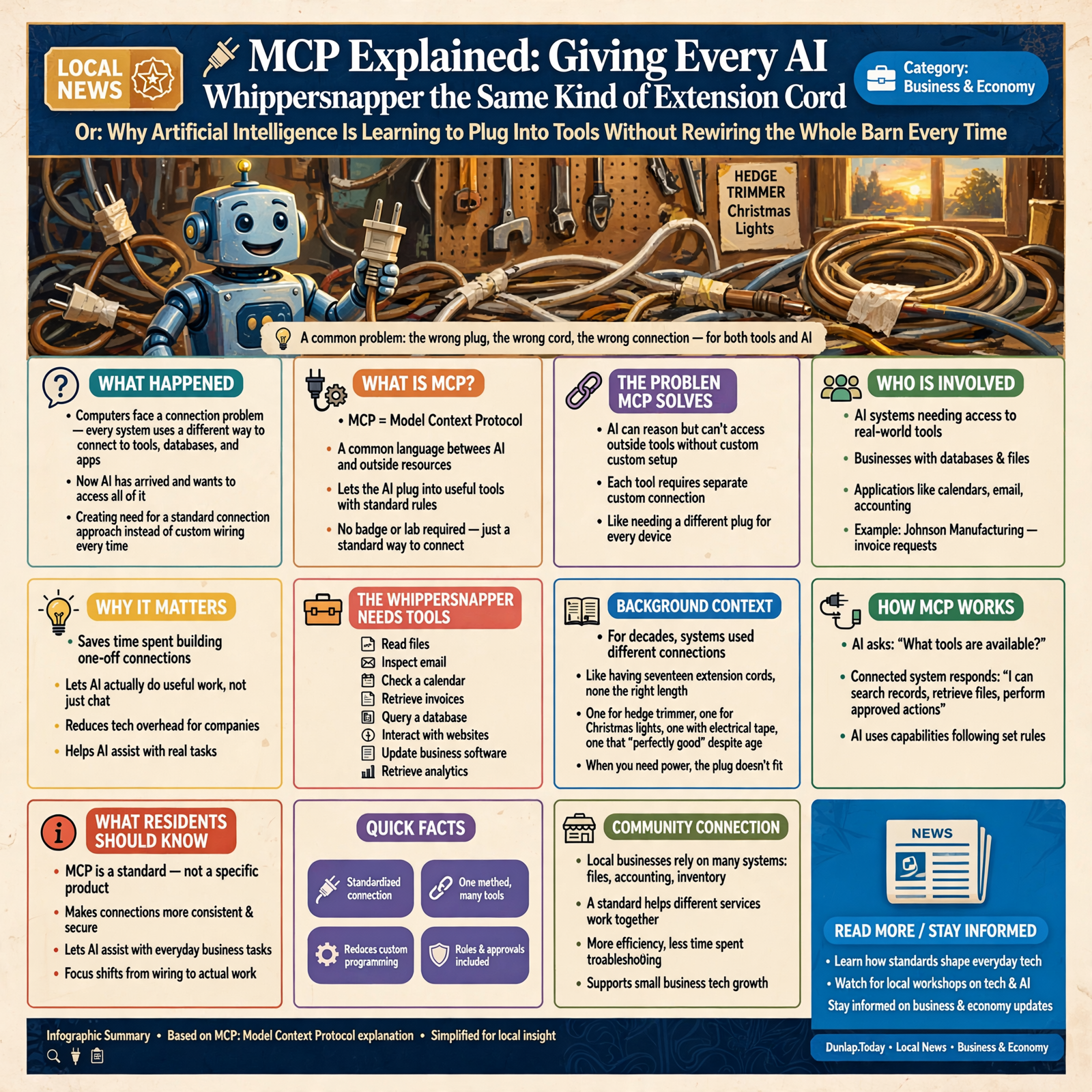
🔌 MCP Explained: Giving Every AI Whippersnapper the Same Kind of Extension Cord

Or: Why Artificial Intelligence Is Learning to Plug Into Tools Without Rewiring the Whole Barn Every Time
There was a time when every household seemed to own approximately seventeen extension cords, none of which were ever the right length.
You had one for the hedge trimmer.
One for Christmas lights.
One with electrical tape wrapped around the middle that nobody remembered buying.
One that Grandpa insisted was “perfectly good” despite having survived three presidential administrations and at least one lawn mower.
And inevitably, when you needed electricity somewhere useful, the plug did not fit whatever contraption you were trying to power.
Computers have spent decades creating their own version of this problem.
Every system has information.
Every application has tools.
Every company has databases.
Every website has some different way of connecting to it.
And now artificial intelligence has arrived, looked around, and said:
“I’d like to use all of that.”
This created a problem.
If every AI system needs a completely different custom connection to every tool, application, database, file system, calendar, website, and business program, we’re going to spend an awful lot of time wiring outlets instead of getting work done.
Enter something called MCP.
That stands for:
Model Context Protocol.
Which sounds like something requiring a badge and access to a laboratory.
But the basic idea is considerably more familiar:
Give the AI a standard way to plug into useful things.
🤖 First, What Problem Is MCP Trying to Solve?

Artificial intelligence becomes much more useful when it can do more than talk.
Imagine asking an AI:
“What’s on my calendar tomorrow?”
Without access to your calendar, the AI can only respond:
“I don’t know.”
You ask:
“How much inventory do we have?”
Without access to the inventory system:
“I don’t know.”
You ask:
“Find the invoice we sent Johnson Manufacturing last March.”
Without access to your files or accounting system:
“I still don’t know.”
At some point you begin wondering why you hired the whippersnapper.
The AI may be extremely intelligent.
But intelligence without access to useful tools is like hiring the world’s greatest mechanic and refusing to let him into the garage.
MCP is one approach to solving that connection problem.
🧰 The Whippersnapper Needs Tools

An AI model by itself can reason with information it already has available.
But real work usually requires tools.
A business AI may need to:
- 📂 read files,
- 📧 inspect email,
- 📅 check a calendar,
- 🧾 retrieve invoices,
- 🗃️ query a database,
- 🌐 interact with websites,
- 📝 update business software,
- 📊 retrieve analytics,
- or communicate with another service.
Before standardized approaches, every one of those connections could require special programming.
It was the computer equivalent of discovering:
The drill has one plug.
The saw has another.
The lamp requires an adapter.
The radio only works if you hold the wire sideways.
Eventually somebody asks:
“Could we agree on a plug?”
That is the spirit behind MCP.
🔌 MCP Is a Standard Way to Introduce AI to Tools

Think of MCP as a common language between an AI application and useful outside resources.
The AI side can ask:
“What tools are available?”
The connected system can respond:
“I can search these records, retrieve these files, and perform these approved actions.”
The AI can then use those capabilities according to the rules it has been given.
Instead of every AI application learning a completely different homemade method for every service, systems can expose capabilities in a more predictable format.
It’s less like teaching every teenager how to rewire the barn.
It’s more like saying:
“Here’s the outlet. Here’s what you’re allowed to plug into it.”
🛠️ An MCP Server Is Not Necessarily a Giant Computer

The word server scares people unnecessarily.
When folks hear “server,” they imagine an air-conditioned room containing blinking machines and a fellow named Derek who has not seen daylight since Tuesday.
In this context, an MCP server can simply be software that exposes particular tools or information to an AI system.
It might provide access to:
- a folder of documents,
- a database,
- a website-management system,
- an accounting application,
- an email service,
- a calendar,
- a development environment,
- or some specialized business process.
The server essentially says:
“Here are the things I know how to do.”
The AI can then decide which approved capability is relevant to the task.
🪛 Tools Are Like the Pegboard in Grandpa’s Workshop

Picture Grandpa’s workshop.
Across one wall is a pegboard.
Everything has a place.
There is:
- a hammer,
- a socket set,
- pliers,
- a tape measure,
- a screwdriver,
- and one mysterious tool nobody under forty is permitted to touch.
The teenager walks in.
Grandpa does not hand him the entire workshop.
He says:
“For this job, use the 9/16 wrench.”
An MCP-connected system can work similarly.
The AI may discover a set of tools such as:
- SearchCustomers
- FindInvoice
- GetInventory
- ReadDocument
- CreateDraft
Each tool has a defined purpose.
The agent chooses the one appropriate to the job.
That is much safer and clearer than simply telling the AI:
“Here’s the whole computer. Have at it.”
📂 MCP Can Also Expose Information, Not Just Actions

Sometimes the AI does not need to perform an action.
It merely needs information.
For example:
“What products do we sell?”
“What does our employee handbook say about vacation?”
“What files are in this project?”
“What is the current configuration?”
MCP-style integrations can expose useful resources and context as well as actions.
Think of the difference between:
handing the teenager a wrench
and
handing him the service manual.
Both may be necessary.
One lets him do something.
The other helps him understand what he should do.
🧠 This Fits Nicely With RAG

In our previous AI Whippersnapper article, we explained RAG by sending the kid to the filing cabinet.
MCP and RAG can complement each other.
RAG answers:
“How can the AI retrieve the right information?”
MCP can help answer:
“How does the AI connect to the system containing that information?”
Suppose your business has 20 years of service records.
The AI needs access.
An MCP connection might expose a search capability.
The retrieval system finds the relevant records.
The AI reads them and answers your question.
One part provides the door.
Another part finds the right filing cabinet.
And hopefully nobody wanders into payroll while looking for a lawn-mower receipt.
🔐 A Standard Plug Does Not Mean Unlimited Electricity

This is important.
Standardizing connections does not mean AI should receive unrestricted access.
Your house may have standardized electrical outlets.
That does not mean you allow the teenager to connect a homemade arc furnace to the bedroom circuit.
MCP systems still need the same guardrails we discussed earlier in this series.
You should consider:
- what information the AI may access,
- which tools it may use,
- which actions require approval,
- which users are authorized,
- what credentials are involved,
- and what gets recorded in an audit log.
The plug is standardized.
The permissions should still be specific.
🧑🔧 Read-Only Is a Beautiful Phrase

Sometimes the AI only needs to look.
This is called read-only access.
If you ask:
“How many open invoices do we have?”
the AI may need permission to read invoice data.
It does not necessarily need permission to:
- change the invoices,
- delete them,
- issue refunds,
- change customer balances,
- or mail checks to strangers.
Read-only access is like telling the teenager:
“You may look through the tool catalog.”
That is very different from:
“Here’s my credit card. Order whatever looks interesting.”
A well-designed AI system understands that difference.
📋 Tools Need Clear Instructions Too

If an AI sees a tool called:
“DO_STUFF”
we have already made a mistake.
Good tools should describe:
- what they do,
- what information they require,
- what they return,
- and what limitations apply.
This helps the AI choose correctly.
It is no different from labeling drawers in a workshop.
If every drawer says:
“MISC.”
Grandpa may know where everything is.
Nobody else does.
Clear tool design makes AI systems more reliable because the whippersnapper does not have to guess which drawer contains the socket wrench.
🧾 MCP Can Help Make AI Actions Easier to Audit

When AI calls a defined tool, the system can often record:
- which tool was called,
- when it was called,
- what information was provided,
- what response came back,
- and sometimes whether human approval was involved.
This creates a much clearer record than allowing an AI to wander around a computer clicking things without structure.
Remember the household question from earlier in this series:
“What exactly did you do?”
A good tool-based system can answer that question.
Instead of:
“I messed with some stuff.”
you get:
“The agent used SearchInvoices, retrieved Invoice 18274, and created a draft summary. No records were changed.”
That is considerably more comforting.
🏪 This Could Matter Enormously to Small Businesses

Small businesses often have information scattered everywhere.
Accounting software.
Email.
Spreadsheets.
WordPress.
Customer databases.
Inventory systems.
Calendars.
Shared folders.
Industry-specific programs installed during the Clinton administration.
Historically, connecting all these systems required expensive custom software.
If standardized AI connections continue improving, small businesses may gain a much easier way to create useful assistants across existing systems.
You might someday ask:
“Which customers ordered this product last year but haven’t reordered?”
The AI checks sales records.
Then:
“Draft a follow-up for them.”
The AI creates drafts.
Then:
“Put those drafts in my review queue.”
The AI places them there.
The work crossed several different systems.
The human gave one objective.
Standardized connectors make that much easier.
🧰 The Same AI Can Potentially Use Different Toolboxes

This is another useful idea.
Suppose you have an AI assistant.
At home it might have access to:
- your calendar,
- personal documents,
- shopping lists,
- and household records.
At work, the same underlying type of AI might connect to:
- customer records,
- inventory,
- accounting,
- website administration,
- and internal files.
The AI’s brain may be similar.
The toolbox changes.
This resembles hiring a capable handyman.
At one job site he has carpentry tools.
At another he has plumbing tools.
You do not need an entirely new handyman every time.
You need the right tools for the job.
🤝 Different AI Systems Can Potentially Use the Same Connection

This is one of the more interesting implications of standardized protocols.
If a business exposes a useful capability in a standard way, different compatible AI applications may potentially use that same interface.
That reduces dependence on one particular AI system.
Think of electricity.
You do not buy a different wiring system because you purchased a new toaster.
The toaster uses the same outlet.
This kind of standardization could make it easier for businesses to change AI providers, experiment with different models, or use several systems for different jobs.
That may prove extremely important.
Because the AI world is moving fast enough that today’s brilliant whippersnapper may not be tomorrow’s.
🔄 MCP Can Help Autonomous Agents Become Actually Useful

Remember Article 1?
We discussed autonomous AI agents.
An agent needs more than intelligence.
It needs the ability to interact with the world.
Suppose an agent’s job is:
“Watch inventory and warn me when we may run short.”
It needs access to inventory records.
Perhaps sales orders.
Perhaps purchase orders.
Perhaps supplier information.
Perhaps email or notifications.
Connections make the agent useful.
Guardrails make the connections safe.
RAG helps it retrieve the correct evidence.
Memory helps it maintain continuity.
Testing helps ensure the system behaves correctly.
Our collection of whippersnappers is beginning to resemble a workforce.
🧑⚖️ The AI Should Not Decide Its Own Permissions

There is one rule worth emphasizing.
The AI should not simply decide:
“I think I need access to payroll.”
and grant itself access to payroll.
Permissions should come from outside the model.
This is the same reason we do not allow teenagers to decide their own curfew.
Ask one:
“What do you think is a reasonable time to come home?”
and you may discover that technically tomorrow morning is still “tonight.”
Some decisions belong to the system owner.
Access is one of them.
🚪 Connections Need Doors, Not Holes in the Wall

This may be the most useful way to think about secure AI integration.
If an AI needs access to a system, build a door.
A door has:
- a defined location,
- a lock,
- a purpose,
- rules about who enters,
- and ideally some record of who came through.
Do not simply knock a hole in the wall.
Structured tool connections are doors.
Unrestricted computer access can become a hole in the wall.
Both allow movement.
Only one makes Grandma comfortable.
🌎 Standards Usually Become Invisible When They Work

Most people do not think about the standards surrounding them.
You plug something into an electrical outlet.
You insert a USB cable.
You connect headphones.
You visit a website.
You send an email.
Underneath each ordinary action are technical standards allowing equipment built by different organizations to cooperate.
The standard disappears.
The usefulness remains.
MCP and similar approaches may eventually become just as boring.
That would be a compliment.
You may simply tell an AI:
“Check the accounting system.”
And nobody will particularly care how the connection works.
In the same way nobody today says:
“Marvel at the standardized alternating-current interface into which I have connected my toaster.”
They make toast.
🐓 Wisdom From the Front Porch

MCP is another one of those technology terms that sounds much more complicated than the idea ordinary people need to understand.
Artificial intelligence is becoming useful enough that it needs tools.
Those tools live in different systems.
If every AI must have a one-of-a-kind connection built for every tool, progress becomes slow and expensive.
Standards make connections easier.
That is the important part.
You do not need to understand every packet, schema, transport mechanism, or software detail any more than you need to understand the electrical grid before plugging in a coffee maker.
You should understand four things:
What is plugged in?
What can it do?
What is it allowed to access?
Can you tell what it did afterward?
Answer those questions well and MCP becomes considerably less mysterious.
So when one of the cool kids starts explaining:
“The agent uses an MCP server to expose tools and resources to the model…”
you can nod thoughtfully.
Then say:
“So you finally gave all the whippersnappers the same kind of extension cord.”
They may object to the technical precision of that explanation.
Let them.
You’ll already understand the part that matters.
The AI has found the toolbox.
Now our job is making sure we control which tools are hanging on the pegboard.
— Dunlap.Today
📚 Plain-English AI Glossary

🔌 MCP: Model Context Protocol. A standardized way for compatible AI applications to connect with external tools, resources, and systems.
🛠️ Tool: A defined capability an AI can call to perform or request a specific operation.
🖥️ MCP Server: Software that exposes approved tools or information through the MCP standard.
🤖 MCP Client: The software on the AI side that communicates with an MCP server.
📂 Resource: Information made available to an AI, such as documents, files, records, or other useful context.
🔐 Permission: A rule defining which information or actions a user or AI system is authorized to access.
👀 Read-Only: Access that allows information to be viewed or retrieved without permitting it to be changed.
🧾 Audit Log: A record showing actions performed by a system.
🔗 Integration: A connection that allows different software systems to exchange information or perform work together.
🌐 Protocol: An agreed set of rules defining how different systems communicate.
❓ Frequently Asked Questions

What does MCP stand for?
MCP stands for Model Context Protocol. It provides a standardized way for compatible AI applications to connect with outside tools and information sources.
Is MCP an AI model?
No. MCP is a connection standard. The AI model provides intelligence; MCP can help connect that intelligence to useful external capabilities.
What can an MCP server connect an AI to?
Potentially many kinds of systems, including files, databases, development tools, content-management systems, business applications, search systems, and online services, depending on the server and permissions involved.
Does MCP automatically give AI access to everything?
No. Access depends on how the integration is configured. Good implementations limit what tools and information are exposed and enforce appropriate permissions outside the AI itself.
How is MCP different from RAG?
RAG is mainly concerned with retrieving useful information to improve an AI’s answer. MCP is a broader connection mechanism that can expose information as well as tools and actions. They can work together.
How is MCP different from an API?
An API is a way software systems expose capabilities to other software. MCP does not replace the general idea of APIs; it provides a standardized AI-oriented interface that can sit between AI applications and underlying services or APIs.
Can MCP be used with autonomous AI agents?
Yes. Tool connections are especially useful for agents because an autonomous agent needs controlled ways to retrieve information and perform actions while pursuing a larger goal.
Does a small business need to understand MCP technically?
Probably not in detail. Business owners mainly need to understand which systems are connected, what actions the AI is allowed to perform, how permissions are controlled, and whether important activity is recorded.
✅ The Front-Porch MCP Checklist

Before connecting an AI to a business system, ask:
- ✅ What system is being connected?
- ✅ What tools or information does the connection expose?
- ✅ Does the AI really need all of those capabilities?
- ✅ Can the connection be read-only?
- ✅ Which actions require human approval?
- ✅ Are credentials protected?
- ✅ Are user permissions respected?
- ✅ Are important actions logged?
- ✅ Can access be revoked easily?
- ✅ Is the connection limited to the specific job being performed?
- ✅ Can the AI explain which tool it used?
- ✅ Can another AI system potentially use the same standardized connection later?
The important rule is simple:
Giving the whippersnapper a standard extension cord is useful.
That doesn’t mean you let him plug in everything in the barn.



0 Comments