

📦 New Gadgets, New Updates: Your Plain-English Tech Check for the Week

Or: What to Do With That Prime Day Box, and Why Your Phone Keeps Asking to Update
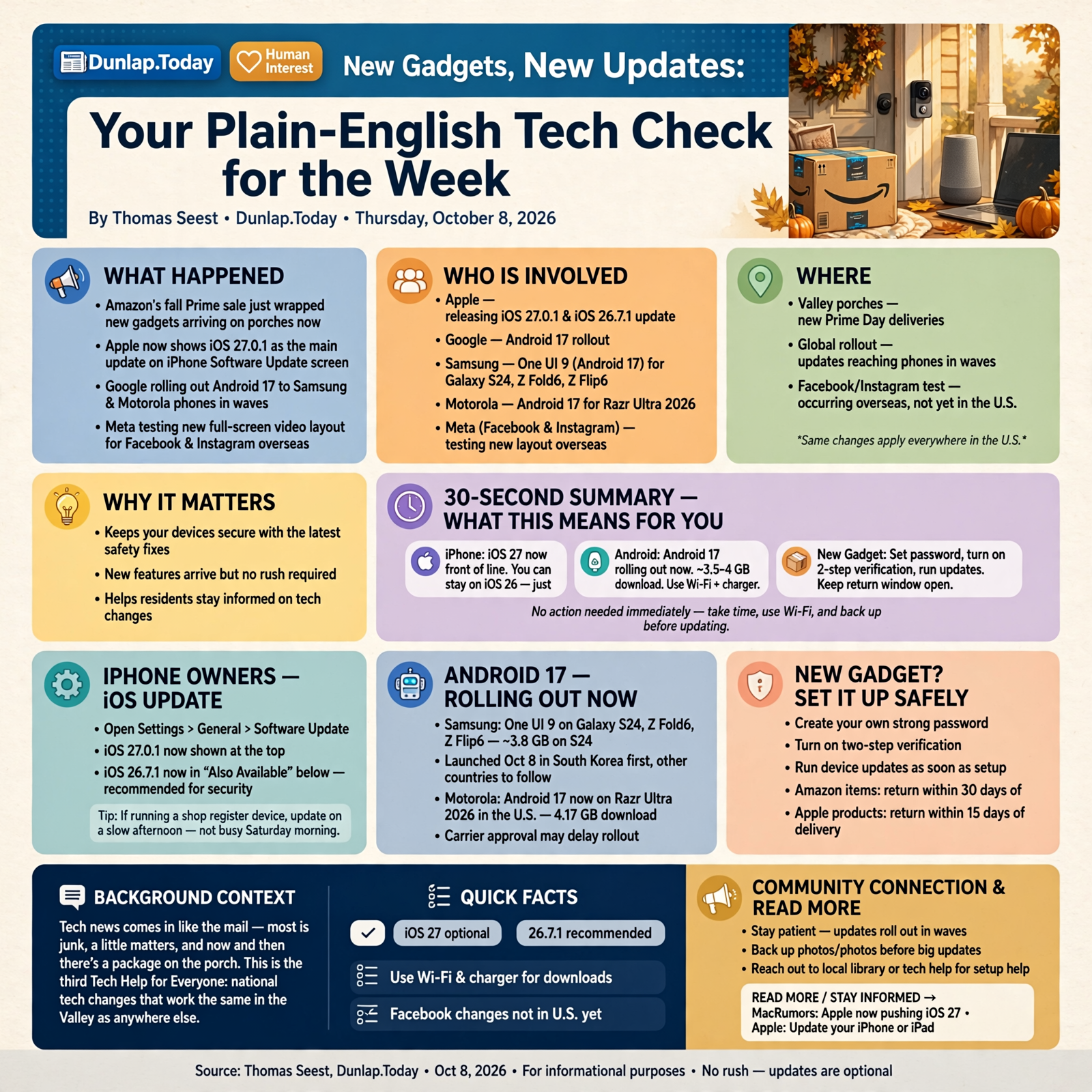
Tech news comes in like the mail. Most of it is junk, a little of it matters, and once in a while there’s a package on the porch. This week brought a little of each. Amazon’s fall Prime sale just wrapped up, so plenty of Valley porches have a new doorbell camera, speaker or laptop sitting on them. Apple and Google both made moves this week that will show up on your phone’s screen. And Facebook is testing a new look overseas that may reach us someday.
Here’s what’s in this third Tech Help for Everyone: why your iPhone’s update screen looks different starting today, the big Android 17 update rolling out to Samsung and Motorola phones, how to set up a new gadget safely and keep your return window open and what Facebook and Instagram are testing.
These are national tech changes. They work the same in the Valley as anywhere else, and none of them need you to do anything in a hurry.
⏱️ What this means for you in 30 seconds
- iPhone still on iOS 26? Apple now puts iOS 27 at the top of the update screen. You don’t have to take it, but at least install iOS 26.7.1 for the security fixes.
- Samsung or Motorola phone? Android 17 is coming in waves. It’s a big download, roughly 3.5 to 4 GB, so use Wi-Fi and a charger.
- New gadget from the Prime sale? Set your own password, turn on two-step verification and run its updates. Most Amazon items can be returned within 30 days of delivery, Apple products within 15.
- Facebook look different someday? Meta is testing a full-screen video layout overseas. Nothing changes for US users today.
🍎 iPhone Owners: Apple Moved iOS 27 to the Front of the Line Today
If you open Settings > General > Software Update on an iPhone still running iOS 26, you’ll notice something new starting today. MacRumors reports that Apple now shows iOS 27.0.1 as the main update, and has moved iOS 26.7.1 down to a smaller “Also Available” section at the bottom. Until today, it was the other way around.
Apple isn’t forcing anyone to move to iOS 27. It’s just nudging. MacRumors says that, at the very least, installing iOS 26.7.1 is recommended to get the latest security fixes.
What it means for you: It’s like the feed store moving the new brand of feed to the front display. The one you’ve always bought is still on the shelf. If you’re happy on iOS 26, scroll down to “Also Available” and install 26.7.1. If you’re ready for iOS 27, plug in, connect to Wi-Fi, make sure your photos are backed up and go ahead. Either way, you’re protected. If you run a shop with an iPhone or iPad at the register, pick a slow afternoon for the bigger update, not a Saturday morning.
👉 Read more (MacRumors: Apple now pushing iOS 27) · Apple: Update your iPhone or iPad
🤖 Android 17 Is Rolling Out to Samsung and Motorola Phones, One Wave at a Time
Google’s next big Android version is reaching more phones this week:
- Samsung: Technobaboy reports Samsung started rolling out One UI 9, its version of Android 17, to the Galaxy S24 phones, Z Fold6 and Z Flip6 on Oct. 8. It went live in South Korea first, with other countries to follow in the coming weeks. Carrier approval can slow it down too. The download is about 3.8 GB on an S24.
- Motorola: Android Authority reports the stable Android 17 update has reached the Razr Ultra 2026 in the US, with a hefty 4.17 GB download. Motorola hasn’t said when many older models will get it.
Motorola lists a redesigned Quick Settings panel (the shortcuts you get by swiping down from the top), notification summaries and widgets you can stack on top of each other among the new features.
What it means for you: Big phone updates are like a new roof. They’re worth having, but you want a dry day and a little prep. When yours shows up, connect to Wi-Fi (that download would eat a lot of a small data plan), plug into the charger, and make sure your photos and contacts are backed up. Then give the phone 20 to 30 minutes to itself. If your swipe-down menu looks different afterward, don’t worry. The same buttons are still there, just rearranged. To check for updates on most Android phones, go to Settings and look for Software update or System updates.
👉 Read more (Technobaboy: One UI 9 for Galaxy S24, Fold6, Flip6) · Android Authority: Motorola Android 17 rollout
📦 Got a New Gadget From the Prime Sale? Set It Up Right, and Mind the Return Date

Amazon’s Prime Big Deal Days ran Oct. 6 and 7, with discounts on doorbell cameras, smart speakers, headphones and laptops. If a box is sitting on your porch, here are a few easy habits before you plug it in and forget about it:
- Use your own strong password. CISA, the federal cybersecurity agency, says to change any default password a new device comes with, and not to reuse a password you use elsewhere.
- Turn on two-step verification. For a Ring doorbell or camera, Ring says to open the app’s menu (☰), tap Control Center, then Account Verification, and pick a text message or authenticator app. It sends a six-digit code when someone signs in, so a stolen password alone won’t get them into your camera.
- Run the updates on day one. Most gadgets get fixes after they leave the factory.
- Know your return date. Amazon’s return policy says most items can be returned within 30 days of delivery, and Apple products within 15 days. The longer holiday return window, if Amazon offers one again this year, typically covers purchases made in November and December, not October. Last year’s ran Nov. 1 to Dec. 31.
- Returning a laptop, tablet or phone? Amazon asks you to erase your personal information first, following the maker’s instructions.
What it means for you: Setting up a gadget is like moving into a house. You change the locks before you hang the pictures. And if you bought something as a Christmas present, open the box and test it now. If it’s a dud, you’ll want to find out while you can still send it back. Small business owners who grabbed a new camera or laptop for the shop, write the return date on the box or in your calendar.
👉 Read more (Amazon: Return policy) · Ring: Two-step verification · CISA: Securing new devices
📱 Facebook and Instagram Are Testing a New Look Overseas
The Verge reported today that Meta is testing a version of Facebook for some users in India that opens straight into a full-screen video feed, a lot like TikTok. Meta hinted it could come to “video-heavy countries” first and possibly reach the US in 2027. A separate Instagram test, live in a handful of countries, lets people make Reels (short videos) the first thing they see. A Meta spokesperson told The Verge that users in the Instagram test can switch back to the regular layout.
What it means for you: Nothing changes on your phone today. Tests are like a new recipe at the church supper. Some become regulars, and some never show up again. If Facebook does look different someday, your friends, family and groups will still be there. For local businesses, it’s one more sign that short videos get noticed. A 15-second clip of the daily special or a new shipment, filmed on your phone, is a fine place to start.
👉 Read more (The Verge: Facebook and Instagram video tests)
✅ Your Weekly Tech Check Checklist
- ✅ iPhone on iOS 26? Go to Settings > General > Software Update and install 26.7.1 from “Also Available,” or iOS 27 if you’re ready.
- ✅ Android update waiting? Wi-Fi, charger and a backup first, then let it run.
- ✅ New gadget? Change the password, turn on two-step verification and update it.
- ✅ Write the return-by date on anything you bought during the sale, and test gifts now.
- ✅ Erase your info before returning any laptop, tablet or phone.
- ✅ Business owners: try one short phone video of something happening at the shop this week.
Practical rule: Updates on Wi-Fi with the charger plugged in, new gadgets get new passwords, and every box gets a return date.
— Dunlap.Today
📚 Plain-English Tech Glossary
- iOS: The software that runs iPhones. iOS 26 is last year’s version, and iOS 27 is the new one.
- Android 17: The newest version of Google’s phone software, used by Samsung, Motorola, Google Pixel and others.
- One UI: Samsung’s name for its own look and features on top of Android. One UI 9 is built on Android 17.
- Quick Settings: The shortcut buttons you see when you swipe down from the top of an Android phone, like Wi-Fi, flashlight and Bluetooth.
- GB (gigabyte): A measure of data. A 4 GB download is roughly what an hour or so of HD video streaming uses.
- Two-step verification: A second check, like a code texted to your phone, on top of your password.
- Authenticator app: A free phone app that makes a fresh six-digit code every 30 seconds for signing in.
- Default password: The password a device comes with from the factory, often printed on a sticker. It should be changed.
- Reels: Short, full-screen videos on Facebook and Instagram.
❓ Frequently Asked Questions

Do I have to upgrade my iPhone to iOS 27?
No. Apple is encouraging it but not forcing it. If you’d rather wait, install iOS 26.7.1 from the “Also Available” section to keep getting security fixes.
Why hasn’t my Samsung phone gotten Android 17 yet?
Samsung releases big updates in waves by country, model and carrier. The rollout started in South Korea on Oct. 8, and other countries are expected in the coming weeks. You can check under Settings > Software update.
Will the big Android update erase my phone?
Normal updates keep your apps, photos and settings. Backing up first is still smart, the same way you’d save your work before the power might blink.
I bought something on Prime Day. When’s my last day to return it?
For most items, it’s 30 days from the day it was delivered. Apple products are 15 days. Look in “Your Orders” on Amazon, which shows the return-by date for each item.
Is Facebook changing for me right now?
No. The full-screen video test is running in India, and the Instagram test is in a handful of other countries. Meta hinted a US expansion could come in 2027, but tests don’t always become permanent.
🔗 Other Resources

- Apple: How to update your iPhone or iPad
- Google: Check and update your Android version
- CISA: Secure Our World, simple online safety steps
- Ring: Setting up two-step verification
- Amazon: Return policy and return windows
🌻 One Box, One Update at a Time

None of this week’s tech news needs to be handled tonight. Open the new gadget when you’ve got a cup of coffee and a quiet half hour. Let the phone update overnight on the charger. And if Facebook ever does change its look, we’ll walk you through it here, plain and simple.
Keep learning, keep exploring and keep your cool. Read Dunlap.Today for calm, clear Valley news, and find local businesses, including the folks who fix computers and phones, anytime on Dunlap.Directory.




0 Comments