
🛒 Before You Click “Buy”: Restart Your Browser, Check the Price History, See Who’s Really Selling and Make Sure the Gift Fits the Phone
Or: Kick the Tires, Read the Tag and Ask Who Owns the Truck
By Thomas Seest, Dunlap.Today · Friday, November 13, 2026
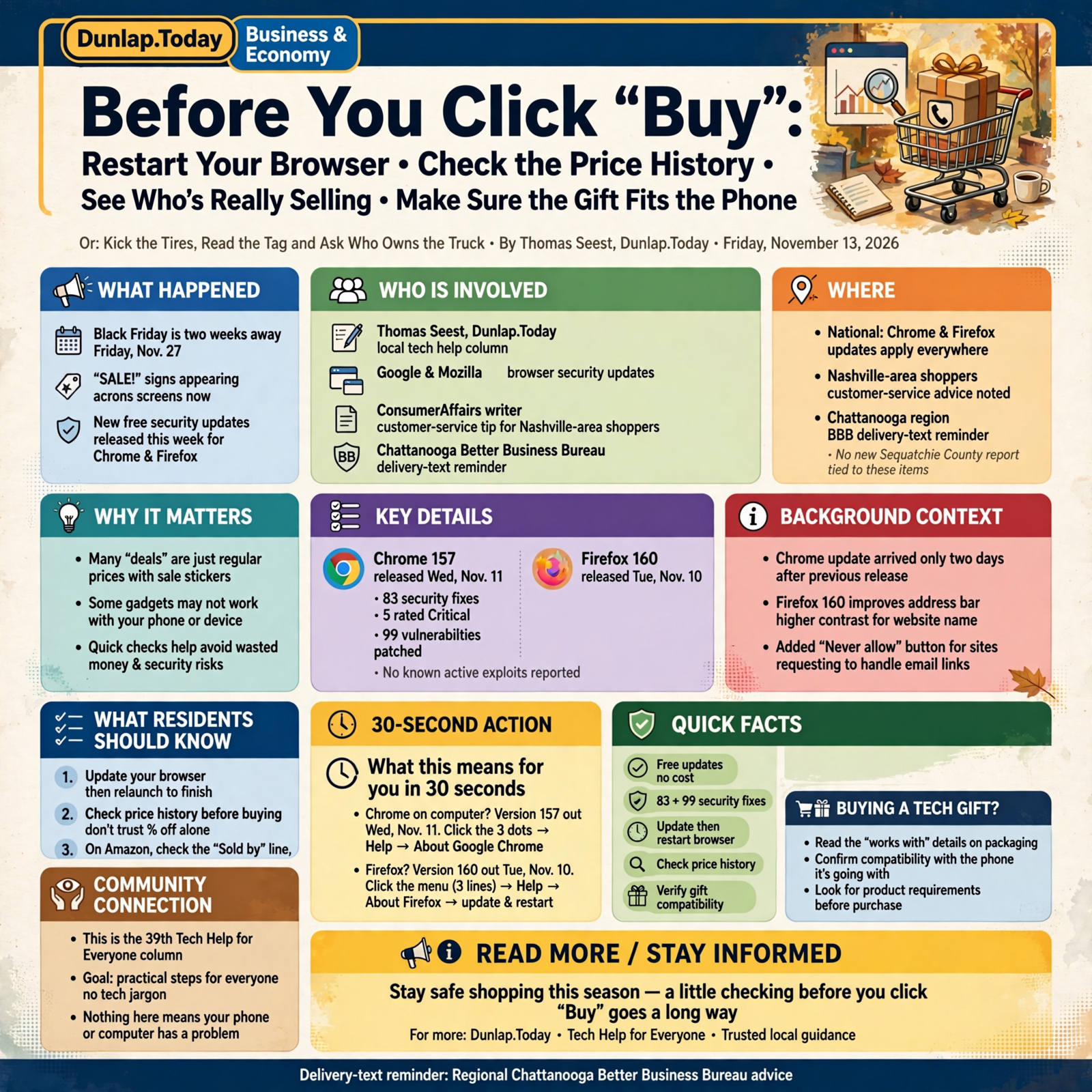
Good afternoon, neighbors. Black Friday is two weeks away, on Friday, Nov. 27, and the “SALE!” signs are already popping up on every screen in the house. Most of those deals are honest. Some are just ordinary prices wearing a party hat. And a few gadgets that look like perfect gifts won’t work their best with the phone Grandpa already has. A little checking before you click “Buy” sorts all of that out, and none of it is hard.
Here’s what’s in this thirty-ninth Tech Help for Everyone: new free security updates for the Chrome and Firefox web browsers this week, a simple way to tell whether a “deal” is really a deal, how to see who’s actually selling an item on Amazon, a “check the box” reminder before you buy a tech gift, and how to find a store’s real customer-service number.
The browser updates, price-history tips and gift-compatibility notes are national. The customer-service number tip comes from a ConsumerAffairs writer’s advice for Nashville-area shoppers (statewide-flavored, not local), and the delivery-text reminder comes from our regional Chattanooga Better Business Bureau. We haven’t seen any new Sequatchie County report tied to these items, and nothing here means your phone or computer has a problem.
⏱️ What this means for you in 30 seconds
- Use Chrome on a computer? Version 157 came out Wednesday, Nov. 11, with 83 security fixes. Click the three dots → Help → About Google Chrome, then Relaunch.
- Use Firefox? Version 160 came out Tuesday, Nov. 10. Update and restart.
- A big “percent off” doesn’t prove a bargain. Check the price history before you buy.
- On Amazon, read the “Sold by” line, not just “Ships from.”
- Buying a gadget as a gift? Check the “works with” fine print against the phone it’s going with.
- Need a store’s help line? Get it from the store’s own app or website, not the top search result.
🌐 Chrome and Firefox Got Free Fixes This Week. Closing the Browser Finishes the Job
This is national news from Google and Mozilla.
Google released Chrome 157 for Windows and Mac on Wednesday, Nov. 11 (version 157.0.8103.78/.79), with 83 security fixes, five of them rated “Critical,” Google’s highest level. Google says it will roll out “over the coming days/weeks.” Malwarebytes noted this update came only two days after the previous one. Mozilla released Firefox 160 on Tuesday, Nov. 10; SecurityWeek reports it patched 99 vulnerabilities. SecurityWeek also reports that neither company mentioned any of these flaws being used in real attacks.
Firefox 160 brought a couple of nice touches, too. Mozilla’s release notes say it increased the contrast between the website’s name and the rest of the address in the address bar, “making it easier to see which website is open,” and added a “Never allow” button for websites that keep asking to handle email links.
How to update Chrome on a computer (Google’s steps):
- Open Chrome. Click the three dots at the top right.
- Click Help → About Google Chrome. Chrome checks for updates on that page.
- Click Relaunch. Google says Chrome saves your open tabs and windows and reopens them. If you don’t see “Relaunch,” you’re already up to date.
Firefox: click the menu (three lines) → Help → About Firefox; it checks and downloads automatically, then click Restart to update Firefox.
What it means for you: Updates download quietly, but many don’t take hold until the browser closes and opens again. It’s like a fresh coat of paint on the porch steps: it isn’t finished until it’s had time to dry. If you leave your browser open for days, give it a restart this weekend before you start shopping.
👉 Read more: Google, Chrome Stable Channel Update (Nov. 11) · Google, Update Google Chrome · Mozilla, Firefox 160 release notes · SecurityWeek, Chrome and Firefox updates
🏷️ “40% Off!” Off of What? Check the Price History Before You Brag About the Deal
This is national shopping advice reported by Engadget on Nov. 7.
Engadget’s guide to Black Friday tech deals makes a simple point: the discount percentage alone tells you very little. It cites a 2025 study by the UK consumer group Which? that tracked 175 products and found 83 percent of them were available for the same price or less at least once outside the four-week Black Friday sales period. (Which? said that doesn’t prove stores raised prices on purpose.)
Engadget’s suggestions for checking a price:
- Google Shopping compares prices from several stores and, for U.S. shoppers, can show whether today’s price is high, low or typical for that item.
- On Amazon, the built-in shopping assistant (now called Alexa for Shopping, formerly Rufus) can show up to 365 days of price history on eligible items, no Prime membership needed. Free price-tracker websites such as CamelCamelCamel and Keepa do the same.
- Watch for shipping costs and coupon requirements that raise the final price at checkout.
What it means for you: It’s like the fellow at the farm sale who says that rototiller “used to go for $900.” Maybe so. But if you’ve seen three just like it at the auction for $400, you know better. Price history is your memory on paper, and for those of us whose memories need a little help, that’s a gift in itself.
👉 Read more: Engadget, How to spot fake Black Friday tech deals
📦 “Ships From Amazon” Isn’t the Same as “Sold by Amazon”: Read One Little Line
This is national shopping advice from the same Engadget guide.
Engadget reminds shoppers to check who’s selling the item, not just who’s shipping it. Even a product listed as “Ships from Amazon” can be sold by a different company, which appears under the “Sold by” heading near the Buy button. The same guide says to visit a store’s website directly instead of clicking links in unexpected emails or sponsored ads, to check the full web address, seller reviews and return policy, and, as the FTC suggests, to pay with a credit card when you can so you can dispute charges for products that never arrive.
What it means for you: Think of it like the hay delivery: the truck might say one farm’s name on the door, but the hay could have come from somebody else’s field. Usually that’s fine. But if there’s a problem, you want to know whose hay it was. A quick tap on the seller’s name shows their reviews and return policy before you pay.
👉 Read more: Engadget, Check who’s selling, not just who’s shipping
🎁 Make Sure the Gift Fits the Phone: Read the “Works With” Fine Print
This is national product news from Google, ZDNET and 9to5Google.
Two new gadgets this week are good examples of why it pays to check before you wrap:
- Google’s Pixel Tag, a $29.99 item tracker for keys, wallets or bags that went on sale Nov. 11. ZDNET reported on Nov. 12 that, according to Google’s own footnotes, several of its best features (like pointing you in the exact direction of the tag, ringing it when you can’t see it, or giving it a custom name) need an Android phone with Bluetooth 6.0 or newer. ZDNET lists phones like the Pixel 10 and 11 families and the Galaxy S26 Plus and Ultra; it says older Android phones may only get basic general-location tracking.
- Google and Samsung’s new smart glasses, announced Nov. 12 with Warby Parker frames from $395. 9to5Google reports they work with iPhones too, but require an iPhone 13 Pro or newer. Stores get them Dec. 10.
What it means for you: It’s like buying a new blade for the chainsaw: the right length matters more than the price. Before you buy any gadget for someone, flip the box over (or scroll down the web page) to the “Compatible with” / “Requires” section and compare it to the phone the person actually carries. A sneaky way to find out: ask them to read you what it says under Settings → About phone (Android) or Settings → General → About (iPhone).
👉 Read more: ZDNET, Pixel Tag won’t work as well on older Android phones · Google, Pixel Tag · 9to5Google, Android XR glasses work with iPhone
📞 Need Help With an Order? Get the Phone Number From the Store, Not the Search Results
This is advice from a ConsumerAffairs writer for Nashville-area shoppers, reported by the Davidson County Herald on Nov. 12, plus a regional reminder from the Chattanooga BBB on Nov. 13.
According to the Davidson County Herald, ConsumerAffairs writer Kyle James warned that some people buy sponsored search listings showing phony “customer service” numbers for big retailers, and those can appear above the real number in search results. His advice: find the real support line through the store’s official app or website. He also said legitimate companies don’t text customers to verify a tracking number or address.
In the Chattanooga Times Free Press on Nov. 13, Chattanooga BBB President Michele Mason said peak shopping season brings more fake texts and emails about delivery problems, like a wrong address or a small “delivery fee,” that lead to look-alike websites. The BBB’s advice: check the delivery yourself before clicking, in the store’s or shipper’s own app or website.
What it means for you: It’s like calling the vet. You don’t dial whatever number is scrawled on a flyer at the gas station; you use the one on the magnet on your fridge. Write down (or save in your contacts) the real help numbers for the two or three stores you use most, straight from their websites or the back of your receipt.
👉 Read more: Davidson County Herald, Four common Black Friday scams · Chattanooga Times Free Press (Chattanooga BBB), Protect your packages and your information
✅ Your Before-You-Click-“Buy” Checklist

- ✅ Chrome on a computer: three dots → Help → About Google Chrome → Relaunch.
- ✅ Firefox: menu → Help → About Firefox → Restart to update.
- ✅ Before you buy a “deal,” check the price history (Google Shopping, or Alexa for Shopping on Amazon).
- ✅ Add in shipping and coupon fine print before you decide.
- ✅ On Amazon, read the “Sold by” line and tap it to see reviews and returns.
- ✅ Go to the store’s website yourself instead of tapping ads or email links.
- ✅ Pay with a credit card when you can.
- ✅ Buying a gadget as a gift? Match the “Requires” / “Works with” line to the person’s phone.
- ✅ Save the real help numbers for your favorite stores in your phone today.
Practical rule: Restart, research, then buy. A real deal will still be there after five minutes of checking.
— Dunlap.Today
📚 Plain-English Tech Glossary
- Web browser: The program you use to visit websites, like Chrome, Firefox, Edge or Safari.
- Relaunch / restart: Closing a program and opening it again so a downloaded update can take effect.
- Security fix: A free repair from the maker that closes a weak spot someone could misuse.
- Price history: A record of what an item has sold for over past weeks or months.
- “Sold by” vs. “Ships from”: On Amazon, “Sold by” is the business you’re buying from; “Ships from” is who packs and mails it.
- Sponsored listing: A paid ad that shows up at the top of search results, usually marked “Sponsored.”
- Bluetooth 6.0: A newer version of the short-range wireless link phones use. Some new gadgets need it for their best features.
- Item tracker: A small tag you put on keys or a bag so your phone can help find it.
- Compatibility: Whether two devices work together. Look for “Requires” or “Works with” on the box.
❓ FAQ
How do I know if my Chrome is up to date?
Google says to open Chrome, click the three dots, then Help → About Google Chrome. The version number is shown under the “Google Chrome” heading, and Chrome checks for updates right there. If there’s no “Relaunch” button, you’re already current.
Will I lose my open tabs if I relaunch Chrome?
Google says Chrome saves your open tabs and windows and reopens them automatically when it restarts. Private (Incognito) windows won’t reopen.
I use Chrome on my phone. Do I need to do anything?
Phone versions of Chrome and Firefox update through the Google Play Store or Apple’s App Store. If you have automatic app updates turned on, you’re set; otherwise, open the store and check for updates.
Do I have to use a price-tracker website?
No. Engadget points out that Google Shopping can show whether a price is high, low or typical, and Amazon’s own shopping assistant can show price history on eligible items. Even just checking the same item at two or three stores helps.
Is it bad if an Amazon item is sold by another company?
Not at all; lots of honest businesses sell there. It just means that company handles the sale, so it’s smart to tap its name and look at its reviews and return policy first.
Will a Pixel Tag work at all on an older Android phone?
ZDNET says older Android phones that lack Bluetooth 6.0 can likely still see a tag’s general location, but not its best features, such as direction-finding, ringing the tag or naming it. Check Google’s product page for the exact requirements before buying.
Where do I report a fake store or a fake delivery text?
Report scams to the FTC at ReportFraud.ftc.gov. Tennessee consumer complaints can also go to the Attorney General’s Division of Consumer Affairs at tn.gov/consumer. If money left your account, call your bank or card company using the number on the back of your card.
Other Resources
- Google Chrome Releases — Stable Channel Update for Desktop (Nov. 11, 2026)
- Google Chrome Help — Update Google Chrome
- Malwarebytes — Google pushes second Chrome update this week (November 2026)
- Mozilla — Security vulnerabilities fixed in Firefox 160 (Nov. 10, 2026)
- Mozilla — Firefox 160.0 release notes (Nov. 10, 2026)
- Mozilla Support — Update Firefox to the latest release
- SecurityWeek — Chrome, Firefox updates patch over 180 vulnerabilities (Nov. 12, 2026)
- Engadget — November is the month of fake Black Friday tech deals (Nov. 7, 2026)
- ZDNET — Google’s Pixel Tag won’t work as well on older Android phones (Nov. 12, 2026)
- Google — Pixel Tag
- 9to5Google — Google’s new Android XR glasses work with iPhone (Nov. 12, 2026)
- Davidson County Herald — Four common Black Friday scams targeting Nashville shoppers (Nov. 12, 2026)
- Chattanooga Times Free Press — Protect your packages and your information this holiday season, by Chattanooga BBB President Michele Mason (Nov. 13, 2026)
- FTC — ReportFraud.ftc.gov
🌿 Keep Learning, Stay Calm

None of this is cause for worry. It’s the same good sense you’d use buying a used truck: kick the tires, read the tag and ask who owns it. Restart your browser this weekend, look at the price history before you get excited about a percentage, read the “Sold by” line, check that the gift fits the phone, and keep the real help numbers handy. Then enjoy the shopping season with your wallet and your peace of mind both intact.
For more calm, clear help made for Sequatchie Valley readers, keep reading Dunlap.Today, and find local folks who can help with phones and computers anytime on Dunlap.Directory.


0 Comments