

📞 Quiet the Spam Calls and Texts With Free Settings Already on Your Phone
Or: Put a Screen Door on Your Phone, Let the Friends In, and Keep the Pests Out on the Porch
By Thomas Seest, Dunlap.Today · Saturday, October 17, 2026
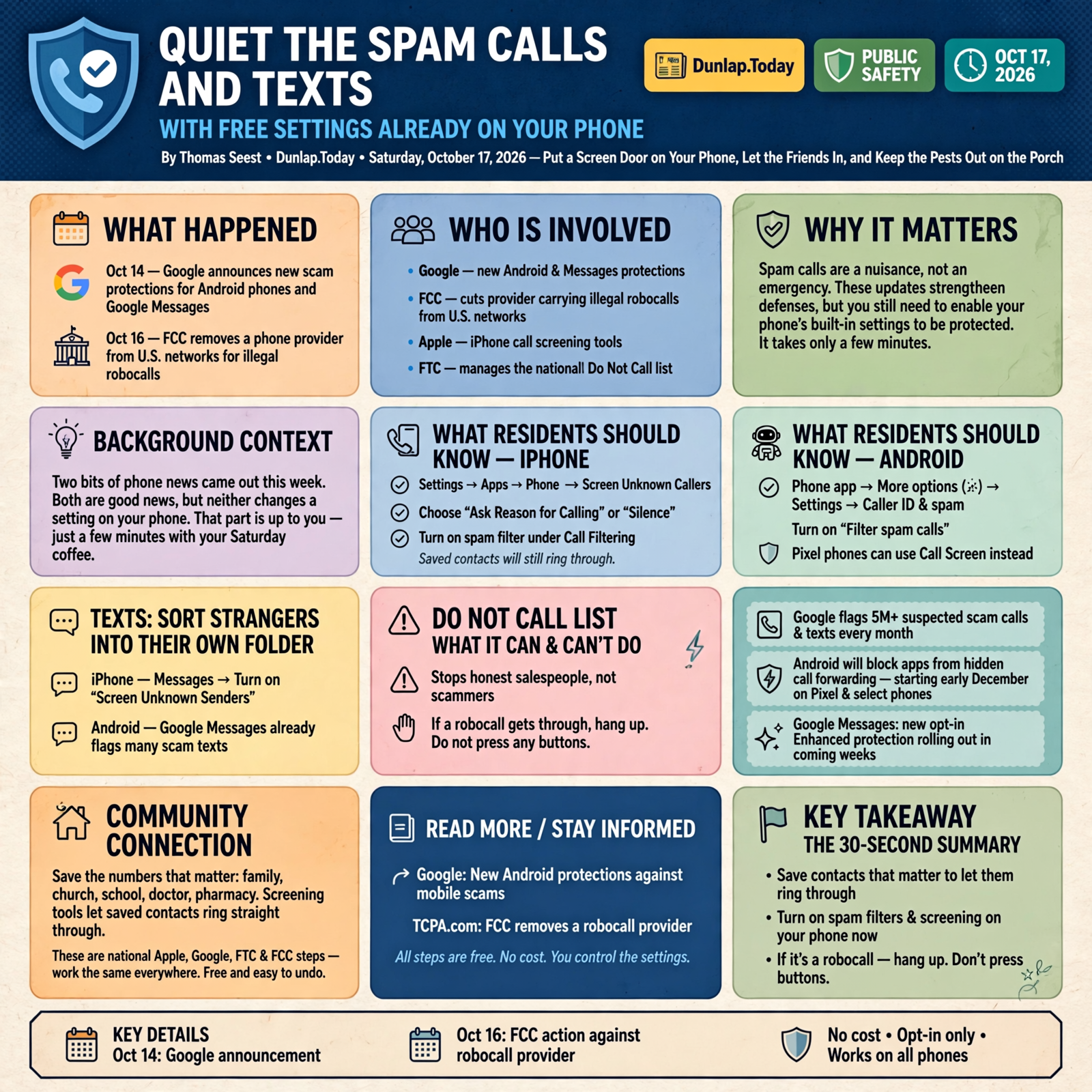
Two bits of phone news came out this week. On Oct. 14, Google announced new scam protections for Android phones and Google Messages. On Oct. 16, the Federal Communications Commission (FCC) cut another phone company off from U.S. networks for carrying illegal robocalls. Both are good news, but neither one changes a single setting on your phone. That part is up to us, and it only takes a few minutes with your Saturday coffee.
Here’s what’s in this twelfth Tech Help for Everyone: why this week’s news matters, how to let an iPhone ask strangers “who’s calling?”, Android’s built-in spam filter and Call Screen, how to sort texts from strangers into their own folder, what the Do Not Call list can and can’t do, and help for home phones and landlines.
These are national Apple, Google, FTC and FCC steps. They work the same in Dunlap as anywhere else. Spam calls are a nuisance, not an emergency, and every tip here is free and easy to undo.
⏱️ What this means for you in 30 seconds
- First, save the numbers that matter (family, church, school, doctor, pharmacy) in your Contacts. Screening tools let saved numbers ring straight through.
- iPhone: Settings → Apps → Phone → Screen Unknown Callers. Pick “Ask Reason for Calling” or “Silence.” Then turn on your spam filter under Call Filtering.
- Android (Google Phone app): Phone app → More options (three dots) → Settings → Caller ID and spam, then turn on “Filter spam calls.” Pixel phones can use Call Screen instead.
- Texts: On iPhone, turn on Screen Unknown Senders in Messages. Android’s Google Messages already flags many scam texts.
- Critical: The Do Not Call list stops honest salespeople, not scammers. If a robocall gets through, hang up. Don’t press any buttons.
🗞️ Why This Week’s News Is Good, and Why You Still Flip the Switch
Google says its scam detection in the Phone and Messages apps already flags more than 5 million suspected scam calls and texts every month. Its Oct. 14 announcement adds an opt-in “Enhanced protection” mode for Google Messages, rolling out “in the coming weeks,” with smarter checks on unfamiliar links and clearer warnings before you tap a link from a number that isn’t in your contacts. Google also says Android will block apps from quietly turning on call forwarding, a trick scammers use to steal sign-in codes. That piece arrives starting early December on Pixel and other select phones.
Meanwhile, the FCC removed a provider called Mexico IP Phone from its robocall database on Oct. 16. Once a company is removed, other phone companies have to stop accepting its calls. The FCC says it has removed more than 1,400 companies from that database since January 2025.
What it means for you: The big folks are working on the fence line, and that helps. But the screen door on your own porch only works if you hang it. The settings below are the screen door.
👉 Read more (Google: New Android protections against mobile scams) · TCPA.com: FCC removes a robocall provider
🍎 iPhone: Let the Phone Ask “Who’s Calling?” Before It Rings

Apple’s support page lays out three easy choices, all in the same spot. Open Settings → Apps → Phone.
- Screen Unknown Callers: Choose Ask Reason for Calling and your iPhone asks callers who aren’t in your contacts why they’re calling before your phone even rings. Choose Silence and those calls go quietly to voicemail. Never means they ring like normal.
- Call Filtering → Unknown Callers: Moves missed calls and voicemails from unknown numbers into their own Unknown Callers list, so your main list stays tidy.
- Call Filtering → spam filter: Turn it on to silence likely spam callers. You can still peek at the Spam list any time with the Filter button in the Phone app.
Apple also notes two helpful safety details: if you call emergency services, call screening turns itself off for 24 hours, and calls aren’t screened while you’re roaming.
What it means for you: “Ask Reason for Calling” is like a good porch dog. It doesn’t bite anybody, it just makes strangers say their business before you get up from the rocker. Real callers usually leave a reason or a voicemail. Pests usually hang up.
👉 Read more (Apple: Manage unknown callers on iPhone)
🤖 Android: Caller ID and Spam, Then Call Screen
On phones that use Google’s own Phone app (Pixel and many others), Google says caller ID and spam protection is on by default. The extra step is telling it to keep spam from ringing at all.
- Filter spam calls: Open the Phone app → More options (three dots) → Settings → Caller ID and spam. Make sure “See caller ID & spam” is on, then turn on Filter spam calls. Filtered calls won’t ring or send missed-call alerts, but they still show in your call history, and you can still check voicemail.
- Call Screen (Pixel and some other phones): In Phone app Settings, look for Spam and Call Screen or Call Screen. Google’s helper answers, asks who’s calling and why, hangs up on spam and rings you for real callers. If your phone has automatic Call Screen, that’s where spam blocking lives instead of the “Filter spam calls” switch.
- Mark as spam: If a pest gets through, you can mark the number as spam to block it and help warn others.
Menu names can vary a little by phone maker. If your Samsung or other phone uses its own Phone app, look in that app’s settings for words like “Caller ID,” “spam” or “block.”
What it means for you: Google says Call Screen uses your saved contacts to decide who to screen, so the grandkids and the pharmacy ring straight through once they’re in your Contacts. Google also says not every spam call can be caught, so a little common sense still rides along.
👉 Read more (Google: Use caller ID & spam protection) · Google: Screen your calls before you answer them
💬 Texts From Strangers Get Their Own Basket
Spam texts are the weeds in the same garden, and both phones can sort them.
- iPhone: Open Messages, tap the menu button in the conversation list, tap Manage Filtering, and turn on Screen Unknown Senders. Apple says texts from numbers you don’t know go to a separate folder, and you aren’t notified unless you choose to be. You can still allow time-sensitive ones, like verification codes, with Allow Notifications. If a sender turns out to be real, tap Mark as Known or add them to Contacts.
- Android: Google Messages already includes scam detection, and the new opt-in Enhanced protection is rolling out over the next few weeks. On Oct. 15, Google also pointed out that Circle to Search can check a suspicious text: long-press the home button or navigation bar, circle the message, and read the guidance. If it shows red flags, Google suggests deleting the message and blocking the number.
What it means for you: Think of it as two egg baskets on the counter, one for folks you know and one for everybody else. You can check the second basket when you feel like it, but it doesn’t buzz in your pocket during supper.
👉 Read more (Apple: Screen and filter text messages on iPhone) · Google: Spot text scams with Circle to Search
📇 The Do Not Call List: Worth Doing, Just Know What It Does

The National Do Not Call Registry is free. You can sign up your home or cell number at DoNotCall.gov or by calling 1-888-382-1222 (TTY 1-866-290-4236) from the phone you want to register.
The Federal Trade Commission (FTC) is plain about its limits: the Registry tells law-abiding telemarketers not to call you, but it doesn’t block calls, so it won’t stop scammers. It also won’t stop charities or companies you already do business with. USAGov says if real companies still call after 31 days on the list, you can file a complaint.
The FTC’s best advice for a robocall that gets through: hang up, and don’t press buttons “to be removed” or to talk to a person. That can lead to more calls. Then report it at DoNotCall.gov.
What it means for you: The list is a “No Soliciting” sign on the gate. Honest salesmen read it and turn around. Pests ignore it, and that’s why the phone settings above do the heavy lifting.
👉 Read more (FTC: National Do Not Call Registry FAQs) · USAGov: Report robocalls and phone scams
☎️ Home Phones and Landlines: Ask Your Phone Company

Plenty of Valley households still keep a kitchen phone on the wall. The FTC says traditional landlines can use a call-blocking device, and home phones that run over the internet have their own blocking options. The FCC says many phone companies already block calls with suspicious patterns, and many offer extra blocking or call labeling (like “Spam” or “Scam Likely” on the caller ID screen), sometimes free.
What it means for you: One phone call to your phone company, using the number on your bill, can turn these on. Ask what free blocking and labeling they offer. The FCC also notes you can opt out of blocking if you’re worried about missing calls you want.
👉 Read more (FTC: How to block unwanted calls) · FCC: Call blocking tools and resources
✅ Your Saturday Screen-Door Checklist

- ✅ Save the important numbers first: family, church, school, doctor, pharmacy, vet, bank and your county offices.
- ✅ iPhone calls: Settings → Apps → Phone → Screen Unknown Callers → Ask Reason for Calling (or Silence). Turn on the spam filter under Call Filtering.
- ✅ Android calls: Phone app → three dots → Settings → Caller ID and spam → Filter spam calls. Pixel owners can set up Call Screen.
- ✅ iPhone texts: Messages → menu → Manage Filtering → Screen Unknown Senders. Allow verification codes if you use them.
- ✅ Android texts: Keep Google Messages updated and watch for the new Enhanced protection setting in the coming weeks.
- ✅ Do Not Call: Register at DoNotCall.gov or 1-888-382-1222. It’s free and helps with honest telemarketers.
- ✅ Landline: Call your phone company and ask about free call blocking and labeling.
- ✅ Help one neighbor: It’s still Cybersecurity Awareness Month. Five minutes on a parent’s or church friend’s phone goes a long way.
Practical rule: Save your real people in Contacts, let the phone screen everybody else, and when a robocall slips through, just hang up. Don’t press a button and don’t call back.
— Dunlap.Today
📚 Plain-English Tech Glossary
- Robocall: A call that plays a recorded message instead of a live person. Many are illegal if you never gave permission.
- Spoofing: When a caller fakes the number on your caller ID so it looks local or looks like a bank or doctor’s office.
- Call screening: Your phone answers an unknown caller first and asks who’s calling and why, before it rings for you.
- Call filtering / spam filter: A setting that silences or sorts likely spam calls into a separate list.
- Call labeling: A tag like “Spam” or “Scam Likely” that shows on your caller ID so you can decide whether to answer.
- Unknown sender / unknown caller: Any number that isn’t saved in your Contacts.
- Do Not Call Registry: A free government list that tells law-abiding telemarketers not to call your number. It doesn’t block calls.
- Call forwarding: A phone setting that sends your incoming calls to a different number. Scammers sometimes try to trick people into turning it on.
❓ Frequently Asked Questions

Will I miss calls from the doctor or the school?
Not if their numbers are saved in your Contacts. Apple suggests adding important numbers, like family, your child’s school and your doctor’s office, so those calls always come through. Google’s Call Screen also uses your saved contacts. With “Ask Reason for Calling,” an unsaved caller can still state their reason, and with Silence they can leave a voicemail.
Is “Silence” or “Ask Reason for Calling” better on iPhone?
Either is fine. “Ask Reason for Calling” lets you hear who’s calling before you pick up, which is handy if you expect calls from new numbers, like a repairman or a new clinic. “Silence” is the quietest choice and sends everyone unknown to voicemail.
Do these settings cost anything?
The iPhone and Android settings here are built in and free. Apple notes standard calling and data rates may apply with call screening. If you want more from your phone company, ask what’s included before you sign up for anything paid.
I signed up for Do Not Call years ago. Why do I still get calls?
Because scammers ignore the list. The FTC says the Registry only stops sales calls from companies that follow the law. That’s why the call-blocking settings on your phone matter more for scam calls.
Should I press 1 to get off their list?
No. The FTC says pressing buttons on a robocall can lead to more unwanted calls. Just hang up, then report it at DoNotCall.gov if you’d like.
A caller says they’re my bank. What should I do?
Hang up and call the number on the back of your card or your bank’s official website. Google gives the same advice for any call you’re unsure about, and our Scam Watch series covers the latest look-alike calls hitting Tennesseans.
🔗 Other Resources
- Google Blog: New Android protections to help keep you safe from mobile scams (Oct. 14, 2026)
- BleepingComputer: Android gets AI defenses against messaging scams and fake calls (Oct. 15, 2026)
- TCPA.com: FCC removes Mexico IP Phone from the Robocall Mitigation Database (Oct. 16, 2026)
- Apple Support: Manage unknown callers on iPhone
- Apple iPhone User Guide: Screen and filter text messages
- Phone app Help: Use caller ID & spam protection
- Phone app Help: Screen your calls before you answer them
- Google: Spot text scams using Circle to Search (Oct. 15, 2026)
- FTC: National Do Not Call Registry FAQs
- FTC: How to block unwanted calls
- FCC: Call blocking tools and resources
- USAGov: Complain about phone and text scams, robocalls and telemarketers
🌻 A Quieter Phone, a Calmer Porch

You don’t have to win the war on robocalls this weekend. Save a handful of real numbers, flip one switch for calls and one for texts, and let the phone do the door-answering for you. The folks who matter will still get through, and the pests can talk to the screen door. Next time a strange number buzzes during supper, you’ll already know what to do: let it go, and keep on eating.
Keep learning, keep exploring and keep your cool. Read Dunlap.Today for calm, clear Valley news, and find local businesses, including the folks who fix phones and computers, anytime on Dunlap.Directory.
Know about an upcoming event or story in the Sequatchie Valley? Submit it here.




0 Comments