
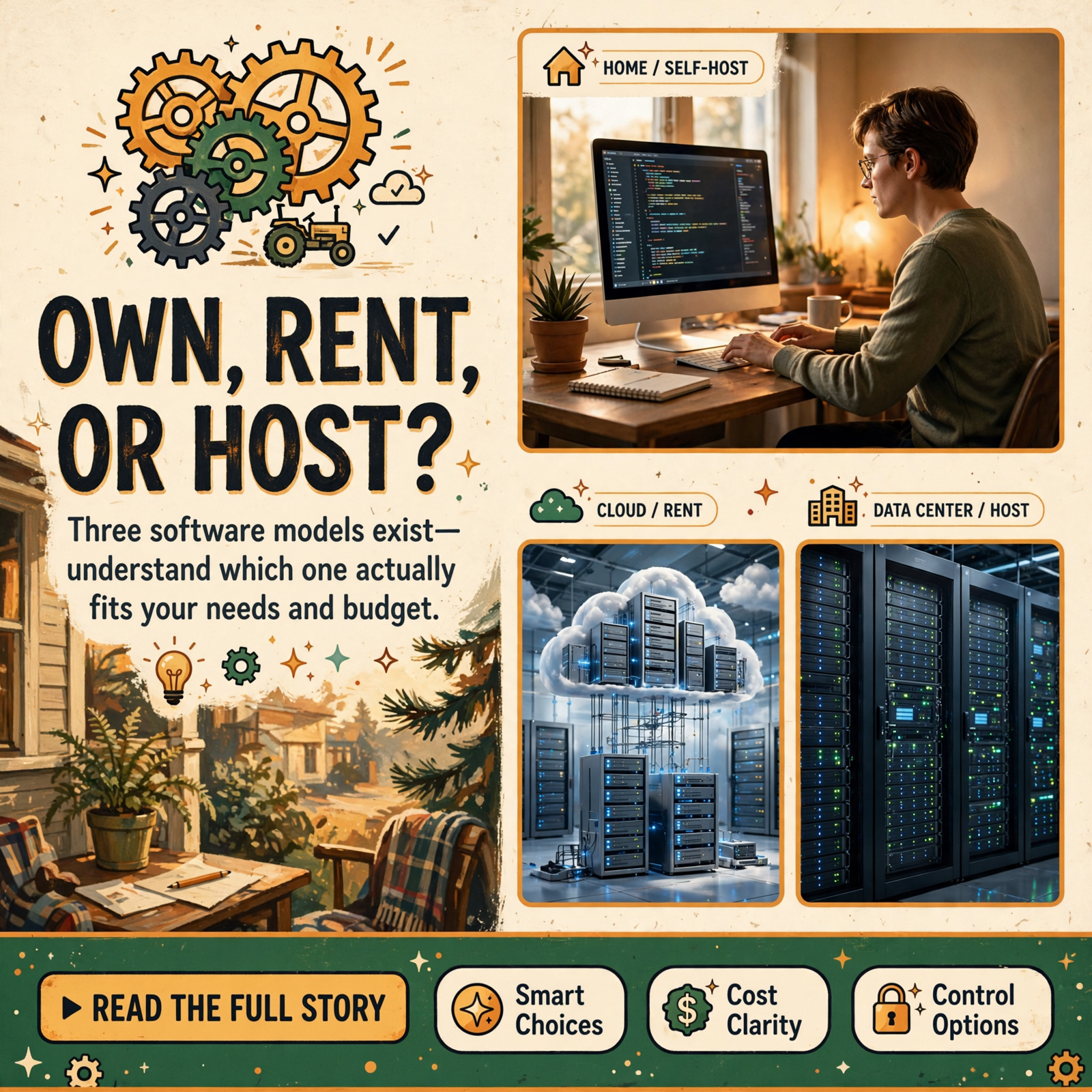
Own It, Rent It, or Host It Yourself? A Plain-English Guide to the Three Ways We Use Software

Suppose you need a tractor.
You have three choices.
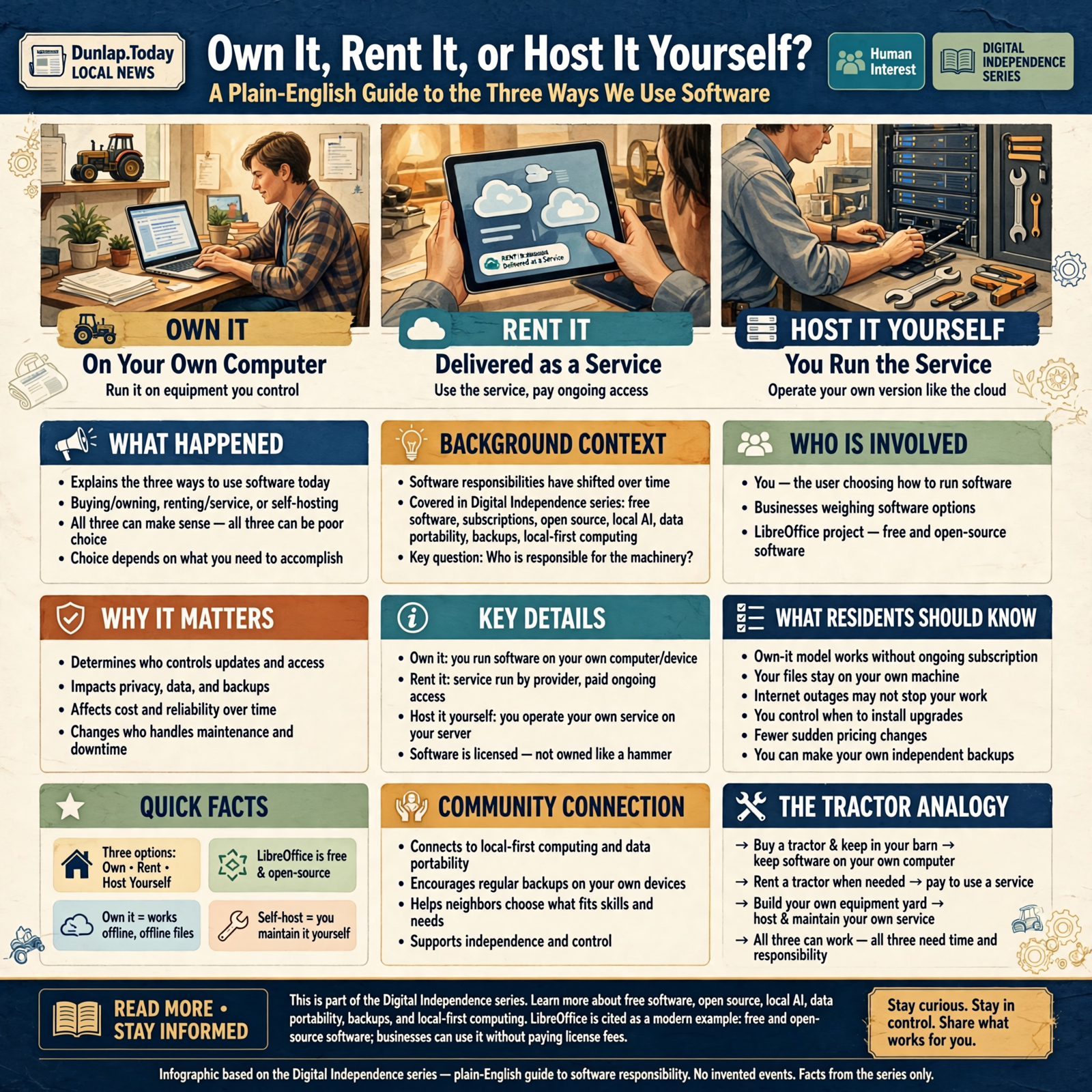
You can buy one and keep it in your barn.
You can rent one whenever you need it.
Or, if you’re feeling unusually ambitious, you can open your own equipment yard, hire a mechanic, stock the parts, maintain the tractors yourself, and then wonder why Saturday disappeared.
All three approaches can make sense.
And all three can be terrible ideas.
It depends on what you’re trying to accomplish.
Software has quietly moved into much the same arrangement.
As we’ve worked through this Digital Independence series, we’ve talked about free software, subscriptions, open source, local artificial intelligence, data portability, backups, and local-first computing.
All of those ideas eventually lead to a bigger question:
Who is actually responsible for the machinery?
Because most modern software now falls into one of three broad arrangements:
- You run it on equipment you control.
- Somebody else runs it and you pay to use the service.
- You operate your own version of a service that would normally live in the cloud.
Computer people have much fancier words for these arrangements.
We’ll get to those.
But first, let’s make sure the tractor starts.
Three Different Deals Hiding Behind the Word “Software”

When somebody says, “I bought some software,” that sentence can mean very different things today.
Maybe they downloaded a program to their computer.
Maybe they signed up for a monthly website.
Maybe their company installed an open-source application on a server they operate themselves.
To the person using it, all three might look like software.
Behind the curtain, however, the economics and responsibilities are completely different.
For this article, we’ll call them:
- Own or control it — software running primarily on equipment you control.
- Rent it — software delivered as an ongoing service by somebody else.
- Host it yourself — software you operate as your own service.
That first category needs a little qualification.
Technically, you usually don’t “own” software the same way you own a hammer. Software comes with licenses that specify what you’re allowed to do with it.
But from an ordinary user’s perspective, the important distinction is practical:
Does the useful thing keep working under my control, or does somebody else’s service have to keep granting me access?
Choice One: Keep the Software on Your Own Computer

This is the arrangement many of us grew up with.
You install a program.
You open it.
You create files.
The work happens on your computer.
The Internet may help with updates or optional features, but the basic program is yours to operate under its license.
LibreOffice is a good modern example. The project describes LibreOffice as free and open-source software and says businesses can use it without paying license fees. LibreOffice’s official FAQ explains the licensing and business-use model here.
You can download it, install it on a computer, create documents, and keep those documents locally.
No monthly office-software landlord needs to approve Tuesday’s spreadsheet.
Why People Like This Model
- You may be able to keep using the software without an ongoing subscription.
- Your files can often remain on your own machine.
- Temporary Internet outages may not matter.
- You have more control over when upgrades occur.
- You may be less exposed to sudden pricing changes.
- You can often make your own independent backups.
That’s a pretty attractive list.
But don’t start engraving LOCAL SOFTWARE FOREVER on the family mailbox just yet.
What You Become Responsible For
The more control you keep, the more responsibility tends to come home with it.
You may need to handle:
- Updates
- Backups
- File organization
- Device security
- Moving information to a new computer
- Compatibility with other people’s software
The software company may provide the tool.
But you own more of the chores.
Choice Two: Rent the Software as a Service

Now we get to the dominant modern model.
You don’t necessarily install the whole system.
You open a browser or an app and connect to a service operated by somebody else.
This is commonly called Software as a Service, usually shortened to SaaS.
Pronounce it “sass.”
Which seems fitting, considering some subscription-renewal emails.
Examples include online accounting systems, project-management services, cloud office suites, website builders, customer-management systems, online storage, and many AI services.
What You’re Really Buying
You aren’t merely buying software.
You’re often buying a bundle containing:
- The software
- The computers running it
- Storage
- Backups
- Updates
- Security maintenance
- Remote access
- Collaboration
- Technical infrastructure
That can be a tremendous bargain.
This is why treating every subscription as waste is a mistake.
Sometimes the monthly bill isn’t renting a hammer.
It’s paying somebody to maintain the entire workshop.
The Restaurant Kitchen Test

Imagine you want a hamburger.
You have two options.
Option one:
Buy hamburger meat.
Buy buns.
Heat the grill.
Cook the food.
Wash the skillet.
Put everything away.
Option two:
Walk into a restaurant and say:
“Cheeseburger, please.”
The restaurant charges more than the raw ingredients cost.
Of course it does.
You’re paying them to maintain:
- The kitchen
- The grill
- The refrigerator
- The staff
- The dishes
- The ingredients
- The cleanup
SaaS is often exactly like that.
You aren’t merely renting software.
You’re outsourcing the kitchen.
Why Subscriptions Became So Popular

Businesses did not move toward subscriptions solely because somebody discovered recurring credit-card charges and rubbed his hands together like a cartoon villain.
There are genuine advantages.
The provider can maintain one continuously updated service instead of supporting fifteen-year-old copies scattered across thousands of computers.
Customers gain automatic upgrades.
Teams can collaborate more easily.
Information can be available from multiple locations.
Small companies can access technology that once required their own expensive servers.
That’s real progress.
The trouble starts when we stop asking whether the service is still earning the monthly payment.
Choice Three: Host It Yourself

Now we arrive at the option that attracts a certain kind of computer person the way an unattended buffet attracts my attention.
Self-hosting.
Self-hosting means you operate the software service yourself—or hire somebody to operate it for you—rather than depending entirely on the software developer’s hosted service.
The program may run:
- On a server in your business
- On a computer at home
- Inside a rented server at a data center
- On a virtual machine
- Through a managed hosting company
Notice something important:
Self-hosted does not necessarily mean the machine is physically sitting beside the washing machine.
You can control the software while still renting the physical computer that runs it.
WordPress Is a Familiar Example
WordPress demonstrates this model nicely.
The open-source WordPress software can be downloaded and installed with hosting you choose. WordPress.org explicitly provides both a download-it-yourself path and guidance for using hosting providers.
That creates several possible arrangements.
You might:
- Install WordPress on hosting you manage.
- Pay a company to manage much of the hosting for you.
- Use a more fully managed WordPress service.
Same basic publishing ecosystem.
Very different responsibility levels.
Nextcloud Takes the Same Idea Into Office Collaboration

Another example is Nextcloud.
Nextcloud provides open-source collaboration software covering areas such as file storage and synchronization, groupware, office collaboration, communication, and related tools. Its platform is designed so organizations can operate the environment under their own control. Nextcloud describes its deployment and control model on its official platform page.
This gives organizations an alternative to simply handing all of their collaboration infrastructure to one large cloud provider.
That’s powerful.
It also means somebody has to keep the machinery running.
Self-Hosting Sounds Free Until Saturday Morning

This is the part that gets lost in enthusiastic online discussions.
Somebody says:
“Why would you pay $20 a month? Just self-host it!”
That word just has ruined many weekends.
Self-hosting can require:
- Installing software
- Applying updates
- Maintaining databases
- Configuring backups
- Monitoring storage
- Renewing certificates
- Managing user accounts
- Watching security
- Recovering from failures
If you enjoy doing those things, wonderful.
If you already employ somebody who knows how to do them, even better.
If your company’s technology department consists of Earl because he once got the printer working…
we should perhaps proceed thoughtfully.
Free Software Can Still Have an Expensive Grocery Bill

This connects directly to something we learned earlier in the series.
Free is a price, not a total cost.
Suppose the software license costs nothing.
You may still pay for:
- A server
- Electricity
- Backups
- Internet bandwidth
- Technical support
- Employee time
- Security
- Maintenance
A free self-hosted system maintained by a $60-an-hour technician for ten hours every month is not a free system.
It’s a $600-a-month system wearing a free hat.
The Three Models Side by Side

Keep It Under Your Control
Best when:
- The application works well locally.
- You value offline access.
- Your files should remain under your control.
- The software doesn’t require complicated infrastructure.
- You don’t need constant collaboration.
Watch out for:
- Backups
- Device failure
- Manual updates
- Compatibility
Rent It as a Service
Best when:
- Convenience matters more than infrastructure control.
- You need access from many locations.
- Teams collaborate constantly.
- You want somebody else handling updates and servers.
- The subscription provides measurable value.
Watch out for:
- Recurring costs
- Price increases
- Vendor lock-in
- Internet dependence
- Data portability
Host It Yourself
Best when:
- Control matters substantially.
- You have technical capability.
- Privacy or data location matters.
- You need customization.
- The economics work at your scale.
Watch out for:
- Maintenance
- Security
- Backups
- Downtime
- Technical complexity
The Real Question Is: Who Gets the 2 A.M. Phone Call?
This may be the best way to understand the difference.
The server stops working at two in the morning.
Who owns the problem?
If you’re using a major cloud service, their operations team is probably already working on it.
If you’re running the system yourself…
somebody you know may be putting on pants.
Control feels wonderful at two in the afternoon.
Responsibility becomes considerably more philosophical at two in the morning.
Small Businesses Should Put a Price on Their Own Time

This is one of the biggest mistakes entrepreneurs make.
They say:
“I’ll save $50 a month by maintaining this myself.”
Then they spend six hours every month maintaining it.
If the owner’s time is worth $50 an hour, congratulations:
You saved $50 by spending $300.
Business owners are especially prone to pretending their own labor is free.
It isn’t.
If you could have spent that same time:
- Serving customers
- Selling
- Managing employees
- Improving operations
- Taking an afternoon off
then the time had value.
But Businesses Should Also Price Dependence
There’s another side.
A $50 subscription may look cheap.
But what if your entire company depends on it?
What if the price becomes $150?
What if the vendor changes the product?
What if your account is suspended?
What if you cannot export ten years of data?
What if an Internet outage stops the whole office?
Dependence has a cost too.
It may not appear on this month’s credit-card statement.
But it belongs in the calculation.
The “Own Everything” Strategy Can Become Its Own Trap

Digital Independence does not mean converting your basement into a server farm.
There is no medal for maximum inconvenience.
You could theoretically:
- Run your own cloud storage.
- Host your own website.
- Operate your own email server.
- Run your own AI.
- Maintain your own database servers.
- Build your own collaboration system.
You could also grow your own wheat, grind your own flour, build an oven, raise chickens, churn butter, and make breakfast entirely from scratch.
There is nothing wrong with that.
But Waffle House has its advantages.
The Smartest Answer Is Often a Mixture

Most sensible households and businesses probably shouldn’t choose only one model.
They should mix them.
You might use:
- LibreOffice locally for ordinary documents.
- A cloud email provider because running email infrastructure is aggravating.
- A self-hosted WordPress site because your website matters strategically.
- Cloud backup because a backup across town is more useful during a house fire than one sitting beside the computer.
- Local AI for private routine tasks.
- Cloud AI for difficult work requiring more horsepower.
That’s not inconsistency.
That’s using the right architecture for each job.
Think in Terms of Layers

A useful way to approach technology is to stop asking:
“Which system should we use?”
and start asking:
“Which parts should we control, and which parts should somebody else operate?”
For example, your business might control:
- The domain name
- The website content
- The customer database exports
- The local files
- The backups
while paying somebody else to operate:
- The physical server
- The Internet connection
- Email delivery
- Payment processing
- Off-site backup infrastructure
That’s often a very healthy arrangement.
Ownership Does Not Mean Doing Everything Yourself

This distinction matters.
You can maintain control without personally turning every wrench.
I own a vehicle.
That does not mean I manufacture my own tires.
I can choose a mechanic.
I can change mechanics.
I can take the vehicle somewhere else.
The useful form of ownership is often:
control plus replaceability.
If your hosting company disappoints you, can you move the website?
If your backup provider raises prices, can you switch?
If your software vendor disappears, can you retrieve your information?
Those are more useful questions than whether every computer physically belongs to you.
Managed Hosting Lives in the Middle

Technology rarely fits into neat boxes.
Managed hosting is a good example.
You may choose software that gives you substantial control while paying somebody else to maintain much of the infrastructure.
WordPress commonly works this way.
You control the site and content, but a hosting provider handles the physical servers, networking, and varying amounts of maintenance.
That can be a wonderful compromise.
You don’t have to choose between:
“Big company controls everything”
and:
“There is a blinking server beside the water heater.”
The Same Spectrum Is Coming to Artificial Intelligence

AI makes this three-way model unusually easy to see.
Rent It
Use an online AI service.
The provider operates enormous computers.
You pay for access.
Run It Locally
Download an appropriate model and let your own computer perform the work.
Host It
A business could operate an AI model on a central server and make it available to employees across its own network.
Same basic AI concept.
Three very different operating models.
And increasingly, software may automatically move among them depending on the job.
The Cheapest Option Can Change With Scale

Imagine a business needs something used by one employee twice a month.
A subscription may be vastly cheaper than building infrastructure.
Now imagine 200 employees use the same capability all day long.
Suddenly operating something internally may become worth examining.
This is why technology decisions that make sense for Walmart may be ridiculous for the hardware store in Dunlap.
And vice versa.
Scale changes economics.
Convenience Has Value

I want to emphasize this because cost-cutting discussions sometimes treat convenience like foolishness.
Convenience is valuable.
If a $15 monthly service:
- Saves you two hours
- Prevents mistakes
- Backs up automatically
- Works everywhere
- Never requires you to maintain a server
that may be an astonishingly good deal.
You are allowed to pay people to make your life easier.
That’s pretty much what civilization is.
Control Has Value Too

On the other hand, control also has value.
Maybe you need:
- Data to remain on your premises.
- A system that works without Internet access.
- Custom integrations.
- Long-term predictable costs.
- The ability to choose another service provider.
- Protection from one company’s policy changes.
Those benefits may justify extra work.
There is no universal answer.
Wisdom From the Front Porch

If you’re paying somebody else to mow the yard, don’t complain that you don’t own the mower.
If owning the mower matters, remember that somebody still has to sharpen the blades.
That’s pretty much the whole article.
Renting isn’t foolish.
Ownership isn’t automatically superior.
Self-hosting isn’t automatically cheaper.
The important thing is understanding the bargain.
A Simple Decision Test for Households

Before choosing a new digital service, ask:
- How often will I use this?
- Does it need to work without Internet access?
- Would I be upset if the subscription price doubled?
- Do I care where the information is stored?
- Can I export my data?
- Am I willing to maintain anything myself?
- Would paying somebody else eliminate headaches worth more than the fee?
Those seven questions will eliminate a surprising amount of nonsense.
A Slightly Tougher Test for Businesses

Businesses should add a few more:
- What happens if the service is unavailable for a day?
- Who is responsible for security?
- Who performs backups?
- Who verifies the backups actually work?
- How difficult is migration?
- What happens to our data if we cancel?
- Do we have the staff to operate this ourselves?
- What is an hour of our staff’s time actually worth?
- Does self-hosting create legal, security, or compliance responsibilities we do not currently have?
- What happens when the one employee who understands the system leaves?
That last question has launched more emergency consulting projects than anybody would care to admit.
The “Wayne Left” Problem

Every small organization eventually has somebody who knows how the thing works.
Maybe it’s Wayne.
Wayne configured the server.
Wayne knows which password matters.
Wayne understands why you must never click that particular button on Friday afternoon.
Then Wayne retires.
Or moves.
Or gets tired of being called every Sunday.
A self-hosted system nobody else understands isn’t independence.
It’s dependency wearing a different hat.
Documentation Is Part of Ownership

If something matters enough to operate yourself, it matters enough to document.
A small business should know:
- Where the system runs
- Who has administrative access
- How it is backed up
- How to restore it
- When it gets updated
- Who supports it
- How to move it
Digital independence isn’t merely possessing the keys.
It’s knowing which door they open.
Plain-English Glossary

Local Software
Software that runs primarily on your computer or another machine you control.
Cloud Software
Software or computing resources operated on remote computers and accessed through the Internet.
SaaS
Software as a Service. Instead of operating the software yourself, you use a service maintained by a provider, commonly through a subscription.
Self-Hosted
Software that you or somebody working for you operates instead of relying entirely on the software vendor’s hosted service.
Hosting Provider
A company that supplies servers and infrastructure where websites, applications, databases, or other systems can run.
Managed Hosting
Hosting where the provider also handles some portion of maintenance, security, updates, backups, or technical administration.
Open Source
Software whose source code is made available under a license permitting specified forms of use, inspection, modification, and redistribution. Open source does not automatically mean self-hosted, free of all cost, or easy to operate.
Total Cost of Ownership
The full cost of using something, including purchase or subscription fees, equipment, maintenance, training, labor, downtime, and support.
The Practical Checklist

- ☐ Identify whether the software is local, hosted, or a mixture.
- ☐ Calculate the annual subscription cost.
- ☐ Include your own labor when comparing costs.
- ☐ Find out where your data is stored.
- ☐ Verify that you can export your data.
- ☐ Understand who handles backups.
- ☐ Understand who handles security updates.
- ☐ Determine what happens during an Internet outage.
- ☐ Determine what happens if the provider disappears.
- ☐ Ask whether self-hosting provides a meaningful benefit.
- ☐ Don’t self-host simply because you can.
- ☐ Don’t subscribe simply because everybody else does.
- ☐ Document any system your business operates itself.
- ☐ Prefer arrangements that preserve realistic exit options.
Frequently Asked Questions

Is buying software always cheaper than subscribing?
No. A subscription may include infrastructure, updates, support, backups, collaboration, and other services that would cost money or time to reproduce yourself. Compare total cost rather than only the license price.
Is self-hosted software free?
Not necessarily. The software license may cost nothing, but hosting, hardware, electricity, backups, technical labor, security, and maintenance can create substantial costs.
Does self-hosted mean the server must be in my building?
No. You can operate software on hardware located in a commercial data center or cloud infrastructure while retaining administrative control over the application.
What is SaaS?
SaaS means Software as a Service. The provider operates the application and its supporting infrastructure, while customers access the service—usually through a browser or app and commonly through a recurring subscription.
Is open-source software the same as self-hosted software?
No. Open source describes the software’s licensing and availability of source code. Open-source software can run locally, be self-hosted, or be offered as a hosted service by somebody else.
Can businesses legally use LibreOffice without paying a license fee?
Yes. LibreOffice states in its official FAQ that businesses ranging from a home office to large enterprises may use the software without paying license fees. Professional support can still be purchased separately.
Can WordPress be self-hosted?
Yes. WordPress.org provides the open-source WordPress software for users who want to arrange their own hosting, while hosting providers can also handle varying levels of the infrastructure for customers.
What is an example of a self-hosted collaboration system?
Nextcloud is an open-source collaboration platform designed to support file storage, synchronization, communication, office collaboration, and related capabilities under infrastructure an organization chooses or controls.
Should a small business self-host everything?
Usually not. Self-hosting makes the most sense when the additional control, privacy, customization, resilience, or economics justify the added technical responsibility.
What’s the best overall approach?
For many households and businesses, the best answer is a mixture: local software where ownership and offline access matter, hosted services where convenience is valuable, and selected self-hosted systems where greater control justifies the responsibility.
One Last Trip to the Equipment Shed

There is nothing foolish about renting a backhoe for one weekend.
There is nothing foolish about owning the pickup truck you use every day.
And there is nothing foolish about maintaining your own equipment when you have the knowledge, need, and scale to justify it.
The foolish part would be assuming the same answer applies to every machine.
Software is no different.
Some tools belong on your computer.
Some are better operated by specialists.
Some are important enough that you may want more direct control.
The trick is understanding which is which.
The Bottom Line

Digital independence does not mean owning every server, rejecting every subscription, or spending Saturday night updating software nobody else in the house knows exists.
It means understanding the bargain you’re making.
When you install software locally, you’re accepting more responsibility in exchange for more direct control.
When you subscribe to a service, you’re paying somebody else to operate much of the machinery.
When you self-host, you’re deliberately bringing some of that machinery back under your own management.
None is universally better.
The important questions are:
What does this cost?
What does it save me?
What do I control?
What am I responsible for?
And can I leave if the arrangement stops making sense?
Answer those honestly and you’ve already made a better technology decision than most people ever do.
Because digital independence isn’t about refusing to rent the tractor.
It’s about knowing whether you need to own one, rent one, or perhaps just pay somebody who already owns a perfectly good tractor to finish the job.




0 Comments