

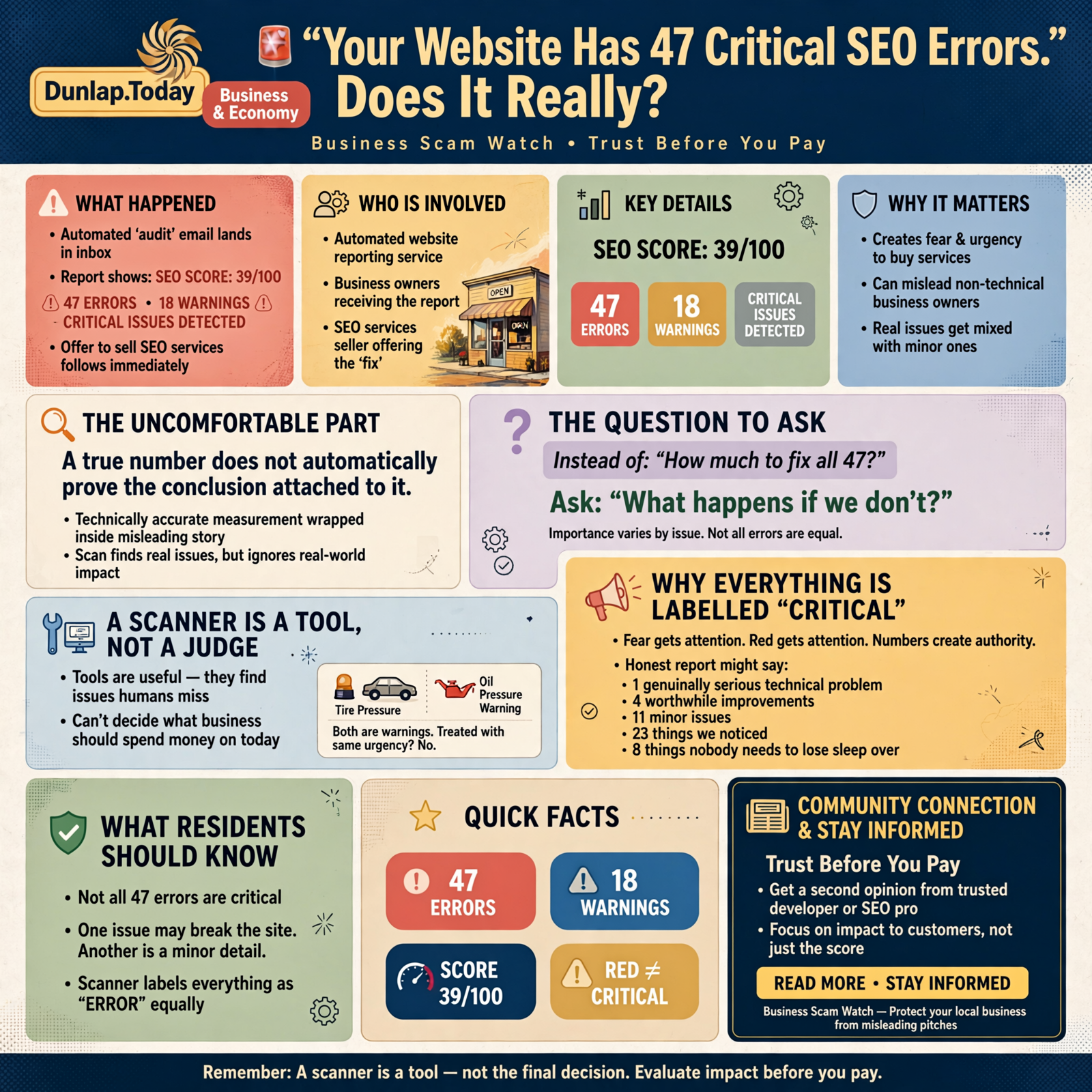
🚨 “Your Website Has 47 Critical SEO Errors.” Does It Really?

Automated website reports can turn ordinary technical imperfections into terrifying red scores—and then sell you the cure.
🚨 Business Scam Watch🔎 Trust Before You Pay
There is something about a red score that makes a perfectly good website suddenly feel sick.
You open an email.
Somebody has “audited” your website.
The report says:
SEO SCORE: 39/100
47 ERRORS
18 WARNINGS
CRITICAL ISSUES DETECTED
Everything is red.
There may be exclamation marks.
There may even be a little gauge pointing toward the bad end.
Then comes the good news.
The person who found all these terrible problems happens to sell SEO services.
What luck. 😂
Here’s the uncomfortable part:
Some of those errors may be completely real.
And that still doesn’t mean the conclusion is right.
That’s what makes this kind of sales pitch more sophisticated than ordinary spam.
A technically accurate measurement can be wrapped inside a misleading story.
So today’s Business Scam Watch rule is:
A true number does not automatically prove the conclusion attached to it.
📊 Let’s Start With The Most Important Question

If somebody says your website has 47 SEO errors, don’t begin with:
“How much will it cost to fix all 47?”
Start with:
“What happens if we don’t?”
That question changes everything.
Because technical issues vary enormously in importance.
One problem might prevent Google from indexing the entire site.
Another may affect a decorative image nobody sees.
One might break the mobile menu.
Another may be a missing description that Google would have rewritten anyway.
One may materially slow the website.
Another may improve an automated score from 94 to 96 while accomplishing almost nothing a customer can perceive.
They are not equivalent simply because a scanner labels both of them:
ERROR.
🔧 A Scanner Is A Tool, Not A Judge

Automated auditing tools can be extremely useful.
I use automated tools myself.
Developers use them.
SEO professionals use them.
Accessibility specialists use them.
Security people use them.
They’re good at finding things humans can easily miss.
The problem begins when the output of a tool is presented as if the tool has already made the business decision for you.
A scanner can tell you:
“This page does not contain X.”
It cannot automatically tell you:
“Fixing X is the most valuable thing this business should spend money on today.”
That’s a different question.
Think about the warning lights in your car.
A tire-pressure light and an oil-pressure warning are both dashboard warnings.
You probably shouldn’t treat them with exactly the same urgency.
The existence of a warning does not establish the severity of the problem.
🟥 Why Everything Is Labeled “Critical”

If an automated report labeled findings honestly, it might say:
- One genuinely serious technical problem
- Four worthwhile improvements
- Eleven minor issues
- Twenty-three things we noticed
- Eight things nobody needs to lose sleep over
That isn’t nearly as exciting as:
47 CRITICAL ERRORS.
Fear gets attention.
Red gets attention.
Numbers create authority.
The combination can be very persuasive to somebody who doesn’t work with websites every day.
That doesn’t necessarily mean the tool itself is dishonest.
Often the software is simply categorizing technical conditions according to its own rules.
The misleading part can come later, when somebody translates:
“The scanner detected 47 conditions.”
into:
“Your website is broken and Google hates it.”
Those are very different statements.
🔍 Google Doesn’t Grade Your Website With One Magic SEO Score

This is worth understanding.
Third-party SEO tools may generate a convenient overall score such as:
62/100
That score belongs to the tool’s methodology.
It is not a secret Google grade pulled from Google’s ranking systems.
Google’s own documentation describes Search performance using measurements such as impressions, clicks, click-through rate, and average position. Google also advises site owners to look at trends in impressions and clicks rather than relying too heavily on position alone.
Google’s ranking systems consider many factors rather than handing every website one universal SEO score.
That’s important.
A marketer can build a useful proprietary score.
But they should not make you believe:
“Google has given your website a 39.”
Google hasn’t.
⚡ What About Google PageSpeed And Lighthouse?

This gets even more interesting because Google itself provides diagnostic tools.
Performance tools can evaluate things such as:
- loading speed,
- responsiveness,
- layout stability,
- accessibility characteristics,
- technical best practices,
- and other measurable conditions.
Those are valuable measurements.
But Google explicitly says site owners should not obsess over achieving perfect scores solely for SEO purposes.
Google’s page-experience documentation says there isn’t one single page-experience ranking signal and explains that excellent scores in tools or reports do not guarantee top search rankings. It specifically notes that pursuing a perfect score just for SEO may not be the best use of time.
That is an extraordinarily useful sentence for a small-business owner.
Because it means:
100 is not automatically the business objective.
The business objective might be:
- more qualified calls,
- more reservations,
- more appointments,
- more local customers,
- more sales,
- or simply making the website easier for people to use.
A performance score can help us get there.
It isn’t the destination.
🏎️ A Perfect Engine With No Customers

Imagine two restaurants.
Restaurant A has a website that scores 100 on every automated technical test imaginable.
Unfortunately:
- the menu hasn’t been updated since 2023,
- the phone number is wrong,
- the restaurant’s hours aren’t clear,
- there are no useful photos,
- and nobody can figure out where the place is.
Restaurant B scores 84.
But:
- the menu is current,
- the address is obvious,
- the phone button works,
- the restaurant shows up locally,
- the photos look delicious,
- and customers can quickly find what they need.
Which website would you rather own?
The answer depends on what you’re trying to accomplish.
A website can be technically elegant and commercially useless.
It can also have technical imperfections and still generate real business.
The ideal is both.
But prioritization matters.
📈 Actual Search Performance Is Harder To Frighten You With

This is where Google Search Console becomes useful.
Google defines impressions as how often a link to your site appears in eligible Google results, clicks as visits from those results, and average position as the average topmost position of your result across impressions.
That lets you ask practical questions:
- Is Google showing the site?
- Are impressions increasing?
- Are people clicking?
- Which searches produce visibility?
- Which pages are appearing?
- Are the searches commercially relevant?
Google itself recommends paying particular attention to trends in impressions and clicks rather than treating average position as the only measurement.
This is exactly what happened in the first article of this series.
The sales message suggested that a young local HVAC website had a visibility problem.
When we looked at relevant local searches and actual Google data, the picture was considerably better.
That doesn’t mean the website was perfect.
It means:
“Not perfect” and “not working” are not synonyms.
📉 Even Average Position Can Mislead You

Remember our Kilgore example?
The site’s overall average position could look unimpressive if somebody pulled one number out of Search Console.
But Google’s own definition explains why.
Average position is averaged across the impressions included in the report. A site may appear at different positions for different queries, users, devices and circumstances.
Google also explains that property-level Search Console data reports the topmost position of a site when multiple URLs appear, and that aggregation choices can change the numbers you see.
So imagine:
Your HVAC company ranks beautifully around Whitwell.
Google also experiments with showing you for searches fifty or a hundred miles away.
You rank poorly there.
Those distant impressions can pull down an overall average.
A salesperson can then show you:
AVERAGE POSITION: 51
and say:
“You’re practically invisible.”
The number may be real.
The conclusion can still be nonsense.
Context is doing all the work.
🧠 This Is The Difference Between Data And Meaning

Data:
47 issues detected.
Meaning:
Which ones matter?
Data:
Performance score: 71.
Meaning:
Is the website actually slow for real users?
Data:
Average search position: 38.
Meaning:
For which searches?
Data:
93 pages have missing meta descriptions.
Meaning:
Are those pages even important landing pages?
Data:
42 images are larger than ideal.
Meaning:
Are they slowing the actual customer experience enough to matter?
This is why expertise still matters even when software gets better.
The software finds.
The human—or a good AI system guided properly—prioritizes.
🩺 Think Of It Like A Medical Test

Imagine getting fifty numbers back from a laboratory.
Three are slightly outside the reference range.
You probably wouldn’t conclude:
“I have three critical diseases.”
You would ask:
- How far outside the range?
- Does this matter in context?
- Is it connected to symptoms?
- Should we repeat the measurement?
- Is it something worth acting on?
A website audit deserves the same reasoning.
The test result is the beginning of interpretation.
Not the end.
🚩 What Actually Deserves Immediate Attention?
There are website problems I would take very seriously.
For example:
- 🚨 Google cannot crawl or index important pages.
- 🔐 The site is compromised or distributing malware.
- 📱 The site is effectively unusable on phones.
- ☎️ The phone number or contact information is wrong.
- 🗺️ Customers cannot determine where the business is located or served.
- 💥 Important pages are broken.
- 🛒 Checkout or lead forms don’t work.
- 🐌 Real users experience severely poor performance.
- 🔄 Important pages redirect incorrectly.
- 🚫 The site accidentally tells search engines not to index it.
Those can affect customers, search engines, revenue, or security.
They deserve attention.
Notice something, though.
I didn’t say:
“Anything colored red in a report.”
🟡 What Might Matter, But Needs Context?

This bucket is enormous.
Examples might include:
- missing meta descriptions,
- very long title tags,
- duplicate title patterns,
- image dimensions,
- minor performance opportunities,
- unused CSS or JavaScript,
- heading structure issues,
- internal-link opportunities,
- structured-data improvements,
- content length observations.
Any one of these might deserve work.
But there is a difference between:
“Worth improving.”
and:
“Your business is losing customers every minute until this is fixed.”
That distinction is where fear-based marketing often lives.
🧹 And Some Findings Are Basically Housekeeping

A mature website accumulates imperfections.
Old pages.
Old links.
Unused images.
Redirect chains.
Odd metadata.
Duplicate templates.
Orphaned content.
None of this means ignore maintenance.
It means:
Maintenance is not necessarily an emergency.
Your garage can need cleaning without your house being condemned.
🤖 AI Will Make The Scary Audit Much Easier To Produce

This is where our series keeps returning to artificial intelligence.
A modern sales system can potentially:
- Find your website.
- Crawl hundreds of pages.
- Run automated tests.
- Identify technical warnings.
- Compare you with competitors.
- Generate a personalized report.
- Write a frightening summary.
- Draft the sales email.
- Send it automatically.
That means the document may be extremely detailed.
Twenty pages.
Charts.
Screenshots.
Numbers.
Technical terminology.
Your competitors’ names.
Your exact URLs.
The fact that the report is customized does not prove the conclusions were thoughtfully analyzed.
A machine may have done almost all of it.
That isn’t inherently bad.
I use AI myself.
The issue is whether automation is being used to create understanding or merely to create fear at scale.
🧪 The Five-Minute SEO Audit Test

If someone sends you a frightening website report, ask these questions before paying.
1. 🔎 Which Three Problems Matter Most?
This question is wonderful.
If there are 47 problems, ask:
“Forget the 47. Which three are costing me the most right now?”
A knowledgeable person should be able to prioritize.
A salesperson reading an automated output may struggle.
2. 📉 What Evidence Shows This Is Hurting Me?
Ask for the connection between the issue and the business result.
For example:
“You say this page is a problem. Is Google failing to index it?”
“Are customers abandoning it?”
“Is it ranking poorly for an important search?”
“Is it genuinely slow for users?”
Move from:
technical condition
to:
business consequence.
3. 🧰 What Tool Produced This Number?
If somebody says:
“Your SEO score is 42.”
ask:
“According to whom?”
The answer may be perfectly legitimate.
But now you understand whose scoring system you’re discussing.
4. 📊 What Do My Actual Google Results Say?
Look at:
- Google Search Console,
- relevant local searches,
- organic clicks,
- impressions,
- queries,
- important landing pages,
- Google Business Profile activity.
A technical audit should complement real performance data, not replace it.
5. 💰 What Happens If We Fix This?
Ask what success looks like.
Will the page load faster?
Will Google be able to index something it couldn’t index before?
Will customers find the contact button more easily?
Will an important query improve?
Will the site become more accessible?
If nobody can explain the intended outcome, ask why the work is a priority.
💵 “We Can Fix All 47 For $2,500”

Maybe that’s a fantastic deal.
Maybe it’s a terrible deal.
The number of errors doesn’t tell you.
Suppose 40 findings can be fixed automatically by changing one template.
Then:
40 errors
might mean:
one fix.
Or suppose one single error prevents every important page from being indexed.
Then:
one error
might matter more than the other 46 combined.
This is why counting findings is often a poor way to estimate value.
🧮 Error Count Is Not Business Impact

This may be the core equation for the entire article:
NUMBER OF ERRORS ≠ AMOUNT OF DAMAGE
Twenty minor warnings can matter less than one broken phone number.
One missing conversion form can matter more than a hundred metadata warnings.
A site that ranks well but takes six seconds to load may deserve performance work.
A site that loads in one second but doesn’t answer the customer’s question may deserve content work.
The right work depends on the bottleneck.
🏪 A Small Business Doesn’t Have An Infinite SEO Budget

This matters enormously for a local business.
Every dollar spent perfecting technical SEO is a dollar not spent somewhere else.
Maybe the next $500 would produce more value from:
- better photographs,
- a stronger Google Business Profile,
- asking happy customers for reviews,
- improving service pages,
- adding useful FAQs,
- fixing conversion tracking,
- creating better local content,
- or simply answering the phone faster.
Technical quality matters.
Opportunity cost matters too.
That’s why the right question is not:
“Can this be improved?”
Nearly everything can.
The right question is:
“Is this the next most valuable thing to improve?”
📍 Local Search Makes Generic Audits Even Trickier

A generic SEO scanner doesn’t necessarily understand your actual business territory.
A local HVAC company may care deeply about:
- Whitwell,
- Dunlap,
- Marion County,
- Sequatchie County,
- and nearby communities.
The same company may not care whether it ranks for a generic phrase across Tennessee.
That’s why our first Business Scam Watch article focused on the strange claim that somebody had searched for “AC repair in AL.”
The search itself wasn’t a meaningful test of the local business.
A technically sophisticated audit can make the same mistake.
It can measure something precisely that the business doesn’t particularly need.
Precision does not guarantee relevance.
🎯 A Better Way To Evaluate A Local Website

For a local business, I’d look at the website in layers.
Layer 1: Can Customers Use It?
- Can they understand what the company does?
- Can they find the phone number?
- Can they contact the business?
- Does it work on mobile?
- Can they find hours and service areas?
Layer 2: Can Search Engines Understand It?
- Can important pages be crawled?
- Are they indexed?
- Does the content clearly describe services and locations?
- Is the technical structure reasonable?
Layer 3: Is Google Actually Showing It?
- Impressions
- Clicks
- Queries
- Relevant rankings
- Local visibility
Layer 4: Is It Producing Business?
- Calls
- Forms
- Appointments
- Orders
- Store visits
- Revenue
Layer 5: What Should We Improve Next?
Now the audit becomes useful.
Not as a scare sheet.
As a roadmap.
🧭 The Business Scam Watch Rule

Our recurring rule remains:
Don’t decide whether the seller is trustworthy first. Decide whether the claim is true first.
Article 5 adds another:
A true measurement can still support a misleading conclusion.
Your website might really have 47 issues.
The important questions are:
Which ones matter?
How much?
To whom?
And what should we do first?
🌄 The Small-Town Version

Imagine your mechanic inspects your truck.
He comes back and says:
“I found 47 things.”
You nearly fall out of the chair.
Then you discover:
Thirty are scratches.
Ten are slightly worn clips.
Four are maintenance items.
Two should be watched.
And one wheel is about to fall off.
Now the number 47 isn’t very useful.
You don’t need somebody to count problems.
You need somebody to tell you:
“Fix the wheel first.”
That’s what good technical advice looks like.
❤️ Don’t Pay For Fear. Pay For Priorities.

I have no problem with website audits.
I like them.
I run them.
I want to know what’s wrong.
I want to improve websites.
But a good audit should leave you better informed, not merely more frightened.
It should explain:
- what was found,
- why it matters,
- how serious it is,
- what evidence supports the conclusion,
- what should be fixed first,
- and what result we expect afterward.
If somebody hands you 47 red warning lights and immediately reaches for your wallet, ask them to slow down.
Pick the top three.
Show the evidence.
Explain the consequences.
Then decide.
Don’t pay for fear.
Pay for priorities.
📣 Send This To Somebody Who Has Ever Received A “Free Website Audit”

That’s probably every business owner you know.
The next time somebody receives a report saying:
“Your website has 47 critical errors,”
teach them to ask:
“Which three actually matter?”
That one question can change an automated sales pitch into a useful technical conversation.
And if the person selling the cure cannot answer it?
You’ve learned something important before spending a dime.
Trust Before You Pay.




0 Comments