
The Five-Minute Scam Check Every Small Business Should Know

There are moments in life when speed is useful.
If the biscuits are burning, move quickly.
If a bull is coming through the gate, this is probably not the time to form a committee.
If somebody emails your business at 4:47 on Friday afternoon saying your website, Google listing, Facebook page, domain name, electricity, bank account or everlasting reputation will disappear unless you pay immediately?
That might be an excellent time to slow down.
Not for a week.
Not for an afternoon.
Sometimes five minutes is enough.
Throughout our Business Scam Watch series, we have looked at fake marketing pitches, questionable Google warnings, invoices that were not really invoices, Facebook threats, scary SEO audits and claims that artificial intelligence has somehow misplaced your business.
The costumes keep changing.
The machinery underneath them often does not.
Many scams depend on getting you to act before you verify.
So this article is about building one habit that works across nearly all of them:
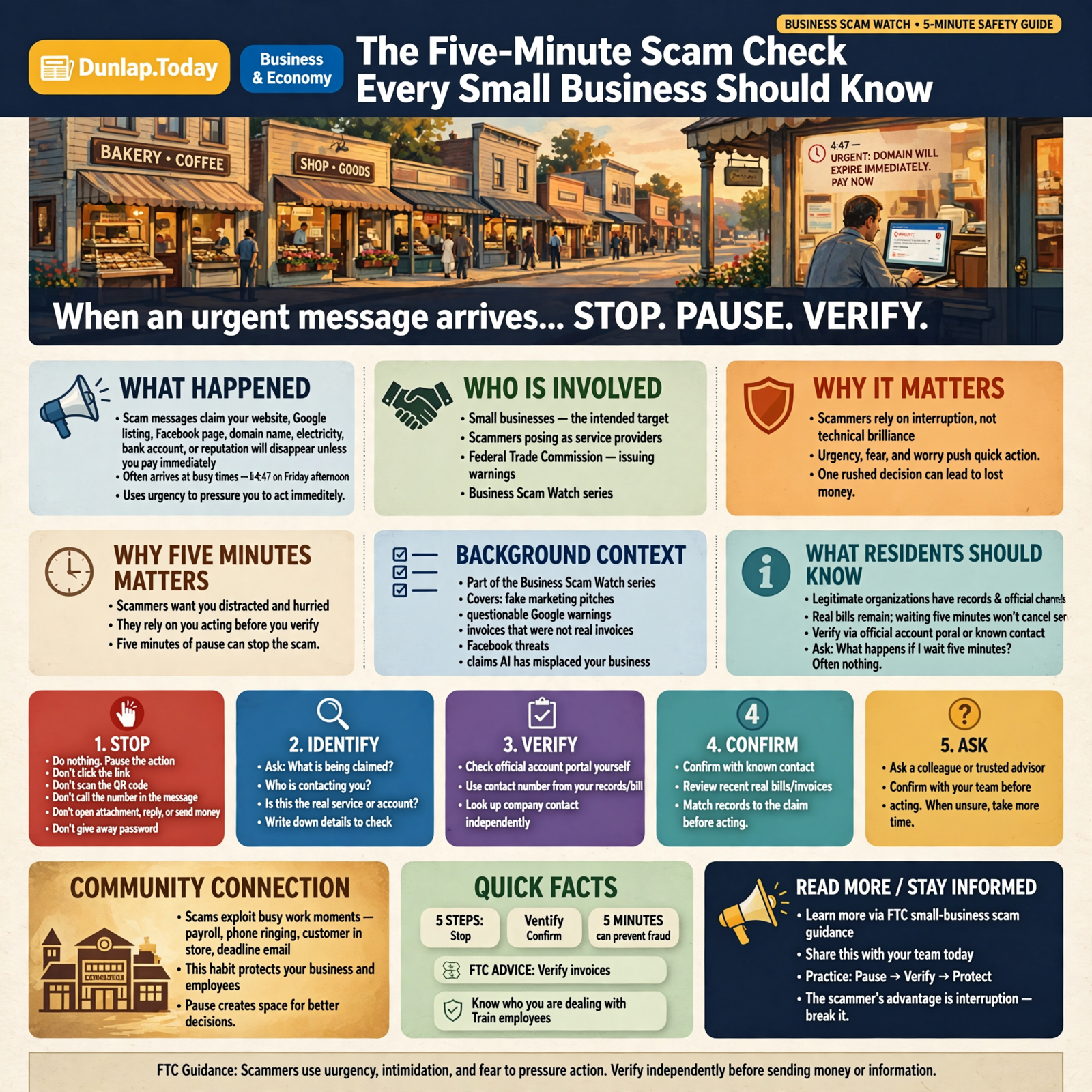
Stop. Identify. Verify. Confirm. Ask.
Five steps.
Five minutes.
And sometimes five minutes is all that stands between your business and somebody else’s payday.
Why Five Minutes Matters

A scammer generally does not want you calmly sitting at the kitchen table with a cup of coffee, reading the fine print.
He would prefer:
- you are busy,
- you are worried,
- you think something is overdue,
- you believe a customer-facing service is about to disappear,
- you think the boss wants something immediately,
- or you simply want the interruption off your desk.
The Federal Trade Commission specifically warns businesses that scammers commonly use urgency, intimidation and fear to push people into acting before they check the claim.
The FTC’s small-business scam guidance also recommends verifying invoices, knowing who you are dealing with and training employees to recognize suspicious requests.
That gives us an important principle:
The scammer’s advantage is often not technical brilliance. It is interruption.
You are trying to get payroll done.
The phone rings.
A customer walks in.
An invoice arrives.
An email says something expires today.
The easiest thing in the world is to deal with it quickly and move on.
Unfortunately, that is exactly what the scammer is counting on.
Step One: STOP

The first step is almost embarrassingly simple.
Do nothing.
Not forever.
Just temporarily.
Do not:
- click the link,
- scan the QR code,
- call the number in the message,
- open the attachment,
- reply to the email,
- send the money,
- give them the password,
- or let the countdown clock frighten you into becoming efficient.
Give yourself permission to stop the transaction.
This matters because many scams are designed as a straight path:
Warning → emotion → action.
What we want instead is:
Warning → pause → verification → decision.
That little detour is where scams often fall apart.
The Emergency Test
Ask yourself:
What actually happens if I wait five minutes?
If the answer is, “Probably nothing,” then you have already learned something.
Real companies occasionally have deadlines.
Real bills become overdue.
Real services can be suspended.
But legitimate organizations generally have records, account portals, customer-service channels and other ways for you to independently verify what is happening.
A legitimate electric bill does not cease to exist because you refuse to use the telephone number printed in a suspicious email.
Step Two: IDENTIFY

Now ask a deceptively difficult question:
Who is actually contacting me?
Do not answer based on the logo.
Logos are cheap.
Do not answer based on the person’s display name.
Anybody can type “Amazon Billing Department” into a name field.
Do not answer based solely on the fact that they know your business name, address or website.
Much of that information is public.
Look deeper.
- What is the complete email address?
- What domain is it coming from?
- Does the domain match the organization?
- Is one letter different?
- Is the caller somebody you already know?
- Do you actually have an account with this company?
- Have you purchased this service?
- Is this a vendor already in your accounting records?
Suppose an email says:
Google Business Listing Department
But the email address is:
listingrenewalservices1987@gmail.com
The big colorful Google-looking logo deserves considerably less respect once you look behind the curtain.
Step Three: VERIFY

This may be the most important step.
Verify the claim using a path that did not come from the person making the claim.
That last part matters.
Suppose somebody calls and says:
“This is your bank. There is fraud on your account. Call our security department at this number immediately.”
If you call the number they provided, you have not independently verified anything.
You have merely asked the same stranger to confirm that the stranger is trustworthy.
Instead:
- use the bank’s official app,
- type the bank’s known website yourself,
- call the number printed on your bank card,
- or use an established contact already in your records.
The same principle works for nearly everything.
If It Is Supposedly Google
Go directly to your Google Business Profile or official Google account.
If It Is Supposedly Facebook
Open Facebook or Meta Business tools yourself rather than clicking the warning email.
If It Is Your Domain Name
Log in directly with your known domain registrar.
If It Is an Invoice
Check your purchase records and existing vendor information.
If It Is Your Utility Company
Use the telephone number on your normal bill or the company’s established website.
If It Is Your Website Provider
Use your normal account portal.
The rule is wonderfully portable:
When someone brings you a problem, do not let them control the only road you use to investigate it.
Step Four: CONFIRM

Verification asks whether the organization or problem is real.
Confirmation asks whether the particular request is real.
That difference becomes extremely important when scammers impersonate people you actually know.
Imagine an employee receives an email that appears to come from the owner:
“I’m in a meeting. I need you to buy six $200 gift cards for customer appreciation. Don’t call me because I can’t talk right now. Send me photographs of the numbers on the cards.”
The employee may recognize the owner’s name.
They may even recognize the writing style.
That is no longer enough.
Call the owner using the number you already have.
Walk down the hall.
Send a message through an established channel.
Ask:
“Did you actually request this?”
That one question ruins a great many clever scams.
The same applies when a familiar vendor suddenly emails:
“We’ve changed banks. Please send all future payments to this new account.”
Maybe they did.
Maybe somebody compromised their email.
Confirm the change with a trusted person using contact information you already possessed before the message arrived.
The FTC recommends clear procedures for invoice and payment approval for exactly this reason.
Step Five: ASK

The final step is one small habit that businesses sometimes neglect because nobody wants to look foolish.
Ask another human being.
“Does this look right to you?”
“Do we actually buy this?”
“Have you heard of this company?”
“Did you order this?”
“Did you change the bank account?”
“Did you send me this message?”
Scammers benefit tremendously from embarrassment.
They want the employee to think:
I should probably know this.
They want the owner to think:
I don’t want my employees to know I almost fell for this.
They want everybody working alone.
A business where employees are comfortable saying, “This seems odd” is much harder to scam.
The Whole Five-Minute Test

Here it is in one place.
- STOP. Do not click, pay, reply or panic immediately.
- IDENTIFY. Determine who is actually contacting you.
- VERIFY. Check the claim through an independent channel.
- CONFIRM. Verify the specific transaction or request with someone you already trust.
- ASK. Get another set of eyes on anything that still feels unusual.
You can print those five words and tape them near the computer where bills are paid.
That may prove more useful than a 47-page cybersecurity manual nobody has opened since it was printed.
Let’s Try It on a Few Real-World Situations

Example 1: “Your Google Listing Will Be Suspended”
STOP: Don’t click the email.
IDENTIFY: Examine the sender address.
VERIFY: Open your Google Business Profile directly.
CONFIRM: Look for an actual notification inside the account.
ASK: If somebody manages your listing, ask whether they see a real problem.
Five minutes later, the scary email may become considerably less scary.
Example 2: An Unexpected $288 Invoice
STOP: Don’t automatically send it to accounts payable.
IDENTIFY: Who sent it?
VERIFY: Check whether the company is an approved vendor.
CONFIRM: Find the purchase order, contract or person who supposedly authorized it.
ASK: “Did anybody actually order this?”
The FTC specifically warns businesses about fake invoices for services they never ordered, including technology support, domain registration and search-engine optimization services. Its 2026 consumer alert, “Run a small business? Pay your bills, not scammers,” recommends checking unfamiliar invoices against actual purchases and known vendors.
Example 3: “Your Website Has 47 Critical Errors”
STOP: Don’t assume “critical” means critical.
IDENTIFY: Who performed the audit?
VERIFY: Ask for the actual report.
CONFIRM: Independently inspect a few claimed problems.
ASK: “What happens if I don’t fix this?”
You may discover that a “critical emergency” means your page title could be twelve characters shorter.
Example 4: “Your Business Is Invisible to AI”
STOP: Do not purchase the rescue package immediately.
IDENTIFY: Who measured your visibility?
VERIFY: Ask which AI system and which search questions they used.
CONFIRM: Repeat meaningful searches yourself.
ASK: “What specifically are you going to change, and how will we measure the result?”
If the answer requires seventeen new acronyms but contains no measurable work, your five minutes have already been productive.
The Five-Minute Rule Works Because Scams Often Follow Patterns

We sometimes imagine scams as brilliant one-of-a-kind schemes invented in underground laboratories by villains wearing dark glasses.
Most are more ordinary.
They reuse patterns because those patterns work.
Watch for combinations of:
- Urgency: “Today only.”
- Fear: “Your account will be suspended.”
- Authority: “This is the government.”
- Familiarity: “This is your boss.”
- Routine: “Here is your invoice.”
- Confusion: complicated language that discourages questions.
- Secrecy: “Don’t tell anyone.”
- Unusual payment: gift cards, cryptocurrency or unfamiliar wire instructions.
- Isolation: instructions not to call the person or company you would normally contact.
The FTC similarly warns businesses about impersonation, urgency and demands for unusual payment methods.
None of these signals individually proves something is fraudulent.
But several appearing together should cause your internal alarm bell to ring.
Not the panic bell.
The verification bell.
What About Sophisticated Scams?

The five-minute check is powerful, but it is not magic.
Some scams are extremely convincing.
A criminal may compromise a real email account.
They may know the names of your employees.
They may know which vendors you use.
They may know when the owner is traveling.
They may imitate someone’s writing.
Increasingly, they may even imitate a person’s voice.
That is why the most important verification should occur outside the channel where the suspicious request arrived.
If the suspicious request came by email, verify by a known phone number.
If it came by text, call directly.
If it came by phone, independently contact the organization.
The more convincing the scam becomes, the more useful independent confirmation becomes.
Your Employees Need Permission to Slow Things Down

Business owners sometimes accidentally train employees to become easier scam targets.
We reward speed.
Pay the invoices.
Answer the customer.
Handle the email.
Take care of the problem.
Don’t bother me unless it is important.
Then one day an employee receives a convincing message supposedly from the owner and tries very hard to be helpful.
A better rule is:
If money, passwords, banking information, account access or an unusual request is involved, you are allowed to slow down and verify.
That should not be considered inefficiency.
It is part of the job.
The FTC calls an informed workforce one of a small business’s best defenses against scams.
Its Cybersecurity for Small Business resources also emphasize employee awareness, email protections and independent verification of suspicious communications.
Create a “No Embarrassment” Rule

Here is another useful policy:
Nobody gets teased for asking whether something might be a scam.
That sounds minor.
It is not.
If employees fear looking foolish, they will handle uncertainty privately.
Scammers like private uncertainty.
You want employees saying:
“Sheddie, take a look at this.”
“Wayne, did you really send this?”
“Tom, do we know these people?”
“Has anybody ever seen this invoice before?”
A ten-second conversation may save thousands of dollars.
Pattern recognition improves with practice.
The goal is not to become suspicious of everybody.
The goal is to become comfortable checking unusual things.
Build a Verification Path Before You Need One

The best time to decide how your company verifies unusual payment requests is not while somebody is waiting for a $23,000 wire transfer.
Create simple rules in advance.
For example:
- Bank-account changes require telephone confirmation with a known vendor contact.
- Gift-card requests require verbal confirmation.
- New vendors require an approval step.
- Unexpected invoices require proof of purchase.
- Password requests are never handled through ordinary email.
- Changes to payment instructions require a second person to review them.
- Urgent account warnings are checked through the company’s official account portal.
These are not complicated cybersecurity systems.
They are business procedures.
That is important because fraud prevention is not merely an IT problem.
Sometimes the strongest firewall in the building is a bookkeeper who says:
“That’s odd. I’m calling them.”
The Payment Method Can Tell You a Lot

Pay particular attention to how somebody wants to be paid.
The FTC warns that scammers frequently demand payment through methods such as gift cards, cryptocurrency or wire transfers.
Why?
Because scammers prefer money that is difficult to recover.
Consider the mismatch.
Your county tax office normally accepts ordinary payments.
Suddenly somebody claiming to represent the government wants $1,800 in Apple gift cards.
The problem is probably not that county government has become unusually enthusiastic about the App Store.
The payment method does not fit the organization.
That mismatch is valuable information.
What Five Minutes Cannot Do

The five-minute check is not a guarantee.
It will not detect every compromised account.
It will not replace good passwords, multifactor authentication, backups, banking controls, email security or employee training.
It will not magically determine whether every unfamiliar company is legitimate.
And there are situations where deeper investigation is appropriate.
But that does not reduce its value.
A seat belt does not prevent every automobile injury either.
We still wear one because it handles a remarkably large number of problems for very little effort.
Five minutes of verification works the same way.
Wisdom From the Front Porch

If somebody says you do not have time to check, that may be the strongest reason to check.
Urgency does not automatically mean fraud.
But artificial urgency is one of the oldest tools in the scammer’s toolbox.
You do not have to become paranoid.
You do not need to distrust every stranger.
You do not need a computer-science degree.
You simply need a habit.
Stop. Identify. Verify. Confirm. Ask.
Plain-English Glossary

Phishing: A fraudulent message designed to trick someone into revealing information, opening a malicious file, visiting a fake website or sending money.
Impersonation Scam: A scam in which someone pretends to be a trusted person, company, government agency or organization.
Spoofing: Making an email address, caller identity, website or other communication appear to come from somewhere it does not.
Business Email Compromise: A type of fraud in which criminals use fake or compromised business email accounts to trick people into sending money or confidential information.
Independent Verification: Confirming a claim through a source or communication channel that the person making the claim does not control.
Social Engineering: Manipulating people into taking an action or revealing information, often by exploiting trust, fear, authority, urgency or habit.
Multifactor Authentication: Requiring more than one form of proof before allowing access to an account, such as a password plus a verification code or security key.
Frequently Asked Questions

Does urgency always mean something is a scam?
No. Legitimate problems can be urgent. Urgency is a signal to verify, not proof of fraud.
What is the safest way to verify an email?
Contact the organization through information you already trust, such as its official app, previously known telephone number, account portal or independently located website. Avoid relying solely on links or phone numbers supplied in the suspicious message.
What if the email comes from somebody I know?
Confirm unusual requests directly. Real accounts can be compromised, and criminals can create addresses that look extremely similar to legitimate ones.
Should employees be allowed to delay payments while verifying them?
Businesses should establish clear procedures that allow suspicious or unusual requests to be checked before money or sensitive information is released.
What if I already clicked the link?
Stop interacting with the page. If you entered credentials, change the affected password through the legitimate service and review the account’s security settings and active sessions. If banking or payment information was involved, contact the relevant financial institution through its established channel.
What if I already paid?
Contact the bank, card issuer or payment service immediately and explain that the payment may be fraudulent. Speed can matter when attempting to stop or recover a transaction.
Can AI help determine whether something is a scam?
AI can help examine wording, domains, patterns and warning signs, but it should be part of the verification process rather than the final authority. The strongest evidence usually comes from independent records, official accounts and direct confirmation.
The Five-Minute Business Scam Checklist

- STOP: Do not immediately click, call, pay, scan or reply.
- IDENTIFY: Look beyond the logo and display name.
- VERIFY: Use an independent website, app, telephone number or record.
- CONFIRM: Ask the real person or vendor whether the request is genuine.
- ASK: Have somebody else look at anything unusual.
- Check whether the request matches your normal business relationship.
- Check whether the payment method makes sense.
- Check whether the sender is creating unnecessary urgency.
- Check whether you actually ordered the product or service.
- Check whether anybody is discouraging independent verification.
- Document suspicious messages so others in the business can recognize similar attempts.
The Bigger Lesson

After several articles in this series, we have seen scams dressed up as marketing companies, Google representatives, invoices, Facebook warnings, SEO experts and AI-visibility specialists.
Tomorrow’s version will wear a different hat.
That is why memorizing individual scams is not enough.
We need to recognize the machinery underneath them.
Pressure.
Authority.
Fear.
Familiarity.
Confusion.
Urgency.
And one request:
Do something before you have time to think.
Our answer can be equally simple.
Give me five minutes.
Five minutes to identify who you are.
Five minutes to check the account.
Five minutes to call the vendor.
Five minutes to ask somebody else.
Five minutes to make sure the emergency actually exists.
The goal of Business Scam Watch is not paranoia.
It is pattern recognition.
Because once you recognize the pattern, the costume matters a whole lot less.
Stop. Identify. Verify. Confirm. Ask.
Trust before you pay.




0 Comments